
Crawl Budget: What It Is, How It Works & When You Should Optimize It (2026 Guide)
Crawl budget is the amount of crawling activity Google is both able and willing to spend on your website. It’s set by two independent factors — how much your server can handle (crawl capacity) and how much Google actually wants to crawl (crawl demand) — and your effective budget is whichever of the two is lower. For most websites, crawl budget is not a limiting factor and doesn’t need active management. It only becomes a real optimization target for large or fast-changing sites where inefficient crawling is measurably slowing down indexing.
That last sentence is the part most articles on this topic skip, and it’s the most important one. Before you spend a sprint on crawl efficiency, you should know whether you actually have a crawl budget problem — because for the vast majority of sites, you don’t.
This guide walks through what crawl budget actually is, how Google’s own documentation defines it (including a July 2026 update that clarified some things a lot of SEOs had only been guessing at), how to tell if it applies to your site, and a practical framework — the Scrapper Growth Engine™ Crawl Efficiency Framework — for fixing it when it does.
What Is Crawl Budget?
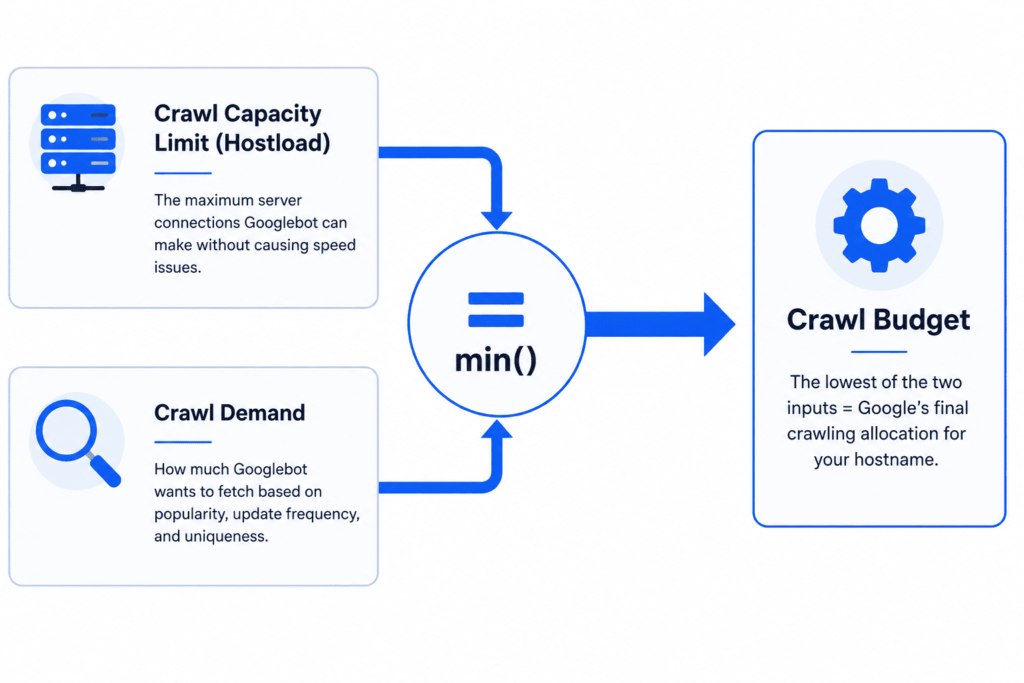
Crawl budget is Google’s term for the finite time and resources its crawlers allocate to any one site. Google’s crawling infrastructure defines a “site” as a unique hostname — www.example.com and blog.example.com are treated as two separate sites with two separate crawl budgets, even if they belong to the same business.
Move Paragraph block from position 6 up to position 5
Move Paragraph block from position 6 down to position 7
Change alignment
Change text alignment
The web is too large for Google to crawl everything, all the time, at full depth. So its systems make a resource-allocation decision for every hostname: how many URLs can we fetch here, and how many do we actually want to fetch, before our time is better spent elsewhere on the web.
Two things are worth internalizing immediately, because they reframe almost everything that follows:
- Crawling is not indexing. A page being crawled doesn’t guarantee it gets indexed. After Google fetches a page, it still has to evaluate the content, check for duplication against other pages, and decide whether the page is worth keeping in the index. Crawl budget only affects the first step in the chain: crawl → index → rank.
- Crawling is not a ranking factor. Getting crawled more often will not, by itself, improve your rankings. Crawling is a prerequisite for appearing in search results, not a signal used to rank them. Optimizing crawl efficiency is about removing a bottleneck to indexing — it is not a growth lever in the same sense as content quality or link authority.
Who Actually Needs to Care About Crawl Budget?
This is the question most crawl budget content skips, and it’s the one that matters most for a business trying to prioritize its SEO roadmap correctly.
Google’s own guidance is explicit that crawl budget optimization is an advanced concern, not a universal one. If your site’s pages tend to get crawled the same day (or close to it) that you publish them, this entire topic is largely irrelevant to you — your time is better spent on content, on-page SEO, or technical SEO fundamentals that affect every site regardless of size.
Google frames the audience for crawl budget optimization as roughly:
| Site Profile | Approx. Size | Update Frequency | Crawl Budget Priority |
| Small business or local site | Under 1,000 pages | Occasional | Not a priority — focus elsewhere |
| Mid-size content site or SMB catalog | 1,000–10,000 pages | Weekly | Low priority unless indexing visibly lags |
| E-commerce, marketplace, or directory | 10,000+ pages | Daily | Worth auditing |
| Enterprise publisher or large marketplace | 1,000,000+ pages | Weekly or faster | Active, ongoing management |
| Any site, regardless of size, with a large share of URLs stuck in “Discovered – currently not indexed” | — | — | Investigate immediately |
These are rough thresholds Google itself describes as estimates, not hard cutoffs. The most reliable real-world signal isn’t your page count at all — it’s the Page Indexing report in Search Console. If a meaningful share of your known URLs sit in “Discovered – currently not indexed” (Google knows the URL exists but hasn’t gotten around to crawling it) or “Crawled – currently not indexed” (Google crawled it but chose not to index it), that’s a genuine crawl-demand symptom worth investigating. If that report looks clean, you almost certainly don’t have a crawl budget problem, whatever your page count.
How Crawl Budget Actually Works: Capacity vs. Demand
Crawl budget is the smaller of two independently calculated numbers.
Crawl Capacity Limit — how much Google can crawl
The crawl capacity limit (Google also calls this “hostload”) caps how much time your server spends holding connections open for Google, based on the number of parallel connections and how long each one takes. It exists so Google can crawl your important content without degrading the experience for your actual visitors.
Every site — new or established — starts at the same conservative default crawl capacity limit. Google’s systems raise that ceiling automatically over time, but only if two things are true simultaneously: there’s demand to crawl more, and your site continues responding quickly and reliably. In other words, you earn additional crawl capacity by being fast and healthy; you don’t start with it.
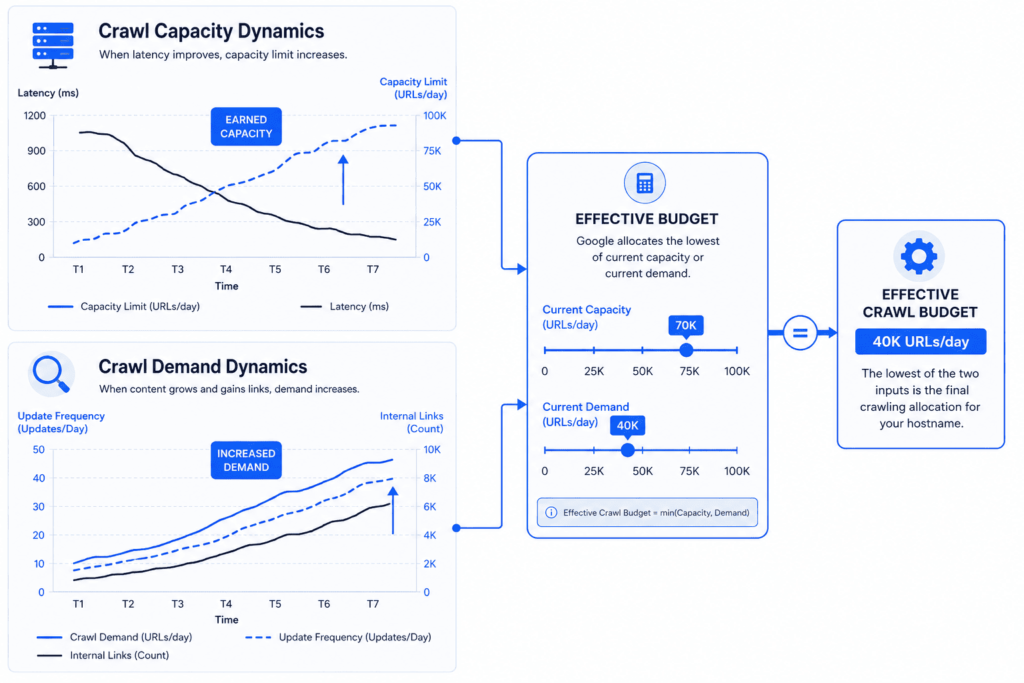
The capacity limit moves in both directions:
- It goes up when your server responds consistently, with stable or improving latency and Time-to-First-Byte.
- It goes down when responses slow down, or when Google encounters server errors (5xx status codes) or rate-limiting signals like HTTP 429.
Crawl Demand — how much Google wants to crawl
Crawl demand is calculated separately for each of Google’s crawlers, based on factors specific to that crawler. AdsBot’s demand rises with active dynamic ad campaigns; Google’s Shopping crawler’s demand rises with the size of your merchant feed. For Googlebot specifically — the crawler responsible for organic Search — demand is driven by your site’s size, update frequency, page quality, and relevance compared to other sites. Three sub-factors matter most, and only one of them is fully within your control:
- Perceived inventory — the total set of URLs Google believes exist on your site. Left unmanaged, Google will try to crawl nearly everything it’s aware of. If a large share of that inventory is duplicate, thin, or otherwise unimportant, it burns crawl time that could have gone to pages that matter. This is the factor you can influence the most.
- Popularity — URLs with stronger internal and external linking tend to get crawled more often, because Google interprets that linking as a signal of importance.
- Staleness — Google wants to recrawl documents often enough to catch real changes, so pages that update meaningfully get revisited more frequently than static ones.
Site-wide events like a domain migration or URL restructuring will also temporarily spike crawl demand, because Google needs to reprocess your content under its new addresses.
What Google’s July 2026 Update Confirmed
On July 22, 2026, Google revised its “Optimize your crawl budget” documentation. Google’s own framing was modest — a clarity and terminology pass — but the specific language it settled on is worth reading closely, because in technical documentation like this, precise wording tends to reflect precise system behavior. Three things stood out:
- The default crawl capacity limit is now explicitly the same starting point for every site. You don’t get a generous allowance on day one; you build toward one through consistent, healthy responses.
- Crawl capacity is confirmed to be shared across all of Google’s crawlers on a given hostname, even though each crawler calculates its own separate demand. Heavy activity from one crawler draws down the pool available to the others.
- Loading speed and HTTP caching got clearer, more prominent billing as the two direct levers for raising effective capacity — specifically, supporting 304 Not Modified responses via ETag or Last-Modified headers so Google can skip re-downloading pages that haven’t changed.
Point two has a strategic implication worth calling out directly, since it’s genuinely new context for 2026 planning. Google operates several distinct crawlers against your hostname — Googlebot for Search, Googlebot-Image, Googlebot-Video, and separately, Google-Extended, the user-agent token specifically used for gathering training data for Google’s generative AI models. Google-Extended can be disallowed in robots.txt independently of Googlebot, without affecting your inclusion or ranking in Google Search. Now that Google has confirmed capacity is pooled per hostname rather than allocated separately per crawler, sites that are capacity-constrained have a clearer, documented reason to reconsider whether AI-training crawl activity is worth the share of pooled capacity it’s drawing away from Googlebot. This isn’t a mandate to block Google-Extended — it’s a genuinely new variable in the capacity equation that large-site owners didn’t have clean documentation to justify before.
| Dimension | Crawl Capacity Limit | Crawl Demand |
| Question it answers | How much can Google crawl without hurting my server? | How much does Google want to crawl my content? |
| Raised by | Fast, stable response times; healthy uptime | Popular, unique, genuinely-updated pages |
| Lowered by | 5xx errors, timeouts, HTTP 429 rate-limiting, slow responses | Duplicate or low-value URLs, staleness |
| Scope | Shared across every Google crawler on your hostname | Calculated separately per crawler |
| Typical owner | Engineering / hosting / DevOps | SEO / content / information architecture |
| Framework category (below) | Infrastructure | Inventory + Signals |
Where Crawl Budget Gets Wasted
If you’ve qualified as a site that should care (see the decision tree below), waste almost always shows up in a short list of recurring patterns:
- Duplicate or near-duplicate URLs — session IDs, sort/filter parameters, tracking parameters, and print/AMP variants that all resolve to essentially the same content.
- Faceted navigation combinatorics — e-commerce filter combinations that multiply into thousands of crawlable URL permutations for the same underlying inventory.
- Soft 404s — pages that return a 200 OK status but display “not found,” “out of stock,” or empty-state content. Google keeps recrawling these instead of writing them off.
- Long redirect chains — every additional hop costs a fetch and slows discovery of the final destination.
- Thin or orphaned low-value pages — old landing pages, abandoned campaign URLs, or auto-generated tag/archive pages with little unique content.
- Slow server response times and error spikes — this is the one capacity-side item on this list; it doesn’t just waste existing budget, it actively shrinks the ceiling.
- Outdated or bloated XML sitemaps — sitemaps that still list removed URLs, or that omit <lastmod> dates, give Google less signal about what’s worth revisiting.
One nuance is worth flagging on its own, because it’s one of the most common crawl budget misconceptions we encounter in client audits: blocking a low-value section in robots.txt does not automatically redirect that freed-up crawling toward your priority pages. Google has been explicit that it will only shift newly available capacity to other URLs if your site was already hitting its crawl capacity ceiling in the first place. If you weren’t capacity-constrained, blocking a section simply means those requests go unspent — not reassigned. Treat robots.txt as a tool for permanently excluding pages you never want crawled, not as a lever for temporarily reallocating budget.
The Scrapper Growth Engine™ Crawl Efficiency Framework
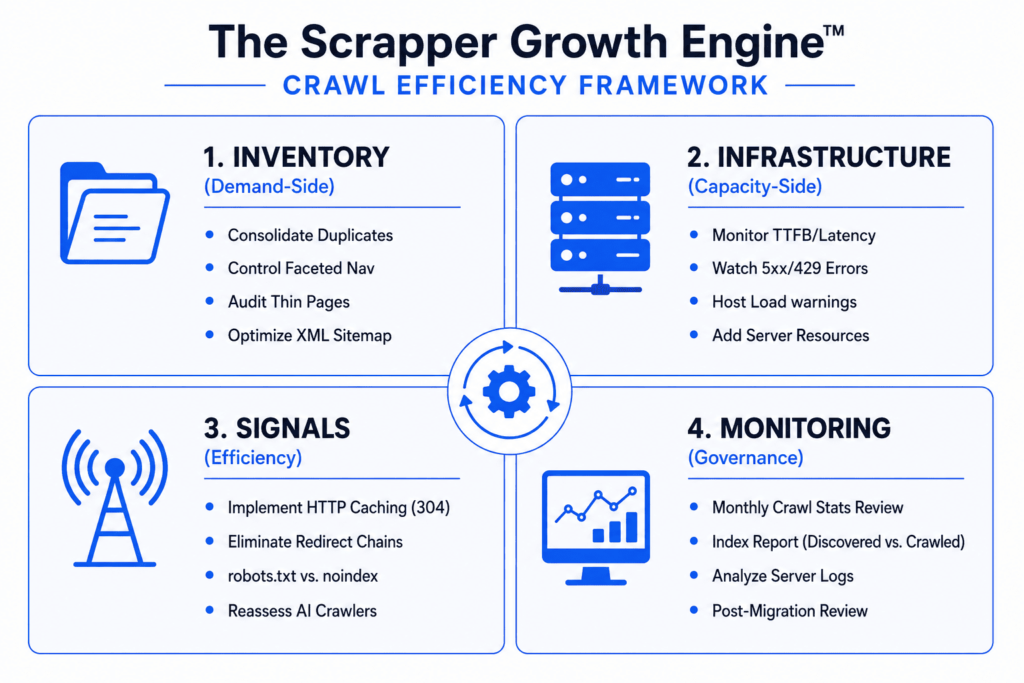
Most crawl budget advice is a flat checklist. In our experience running technical audits, that flat structure makes it hard to tell whether a given fix addresses a capacity problem, a demand problem, or neither — and mixing the two up is how teams end up optimizing the wrong lever first. The Scrapper Growth Engine™ Crawl Efficiency Framework sorts every crawl budget issue into one of four categories, matched to who inside your organization actually owns the fix.
1. Inventory (Demand-side — what you’re asking Google to crawl)
- Consolidate duplicate and near-duplicate URLs with canonical tags rather than letting Google guess.
- Control faceted navigation and parameterized URLs so filter combinations don’t multiply your crawlable surface area unnecessarily.
- Identify and either improve or remove genuinely thin, outdated, or orphaned pages.
- Keep your XML sitemap accurate, deduplicated, and current — include <lastmod> so Google can prioritize recently changed URLs.
- Return a 404 or 410 for content that’s permanently gone. Google treats this as a strong signal to stop revisiting the URL; a URL merely blocked in robots.txt, by contrast, stays in Google’s crawl queue indefinitely and gets reconsidered the moment the block is lifted.
2. Infrastructure (Capacity-side — what your server can handle)
- Monitor server response time and Time-to-First-Byte as core health metrics, not just as a user-experience concern.
- Watch for 5xx errors and HTTP 429 rate-limiting in both server logs and the Search Console Crawl Stats report.
- Make sure hosting can sustain concurrent Googlebot connections without degrading real-user performance.
- Address “Hostload exceeded” warnings in the URL Inspection tool directly with your hosting provider or infrastructure team — this is the one instance where Google’s guidance is unambiguous: if server capacity is the bottleneck, the fix is adding server resources.
3. Signals (Efficiency-side — making every crawl count for more)
- Implement HTTP caching so unchanged pages return 304 Not Modified via ETag or Last-Modified headers, saving Google the cost of a full re-download.
- Eliminate redirect chains — resolve redirects in a single hop wherever possible.
- Use robots.txt with intent: block only what should never be crawled. If your goal is keeping a page out of the index rather than out of the crawl, use noindex and allow the crawl — blocking in robots.txt prevents Google from ever seeing that noindex tag in the first place.
- Reassess whether non-Search crawlers drawing on your shared capacity pool — including Google-Extended for AI training — are worth the trade-off on capacity-constrained sites.
4. Monitoring (Governance-side — verifying it’s working)
- Review the Crawl Stats report (Search Console → Settings → Crawl Stats) on a monthly or quarterly cadence.
- Cross-reference against the Page Indexing report, watching the trend line on “Discovered – currently not indexed” and “Crawled – currently not indexed.”
- Pull raw server logs periodically for full visibility — Search Console’s Crawl Stats report samples data; your logs show everything.
- Re-run this framework after major site events: migrations, replatforms, large content pushes, or significant URL restructuring.
Should You Actually Optimize Crawl Budget? A Decision Tree
Work through these in order. Most sites will exit in the first two questions — and that’s the correct outcome, not a failure to find a problem.
1. Does your site have fewer than roughly 10,000 indexable URLs, with content that isn’t changing daily? → Yes: Crawl budget is very unlikely to be your bottleneck. Direct your effort toward content quality, on-page optimization, and a full technical O audit instead. → No: Continue.
2. In the Page Indexing report, does a meaningful share of your URLs sit in “Discovered – currently not indexed” or “Crawled – currently not indexed”? → No: Your crawl efficiency is probably fine. If pages still aren’t indexing, look at content quality, duplication, or unintentional noindex tags before assuming a crawl problem. → Yes: This is a genuine crawl-demand symptom. Continue.
3. In the Crawl Stats report, are you seeing rising 5xx errors, HTTP 429 responses, climbing response times, or “Hostload exceeded” warnings? → Yes: You have a capacity constraint. Start with the Infrastructure category above before anything else — demand-side fixes won’t help if your server is the ceiling. → No: You likely have a demand-side inefficiency. Start with Inventory, then layer in Signals.
4. Have you recently migrated, replatformed, or restructured URLs at scale? → Yes: Expect a temporary spike in crawl demand as Google reprocesses your site under its new structure. Monitor rather than react for the first few weeks, then revisit this decision tree.
How to Measure Crawl Efficiency in Search Console
Two Search Console reports do almost all of the diagnostic work.
The Crawl Stats Report
Found under Settings → Crawl Stats, this report covers the last 90 days and gives you:
- Over-time charts for total crawl requests, total download size, and average response time — the fastest way to spot a sudden spike or a slow, creeping degradation.
- Grouped crawl data, broken down by response code (200, 301, 404, 5xx, and so on), file type (HTML, image, JavaScript, CSS), crawl purpose (Discovery — a URL crawled for the first time — versus Refresh — a recrawl of a known page), and Googlebot type (desktop, smartphone, image, video).
- Host status, which flags availability issues across three checks — robots.txt fetch, DNS resolution, and server connectivity — over the same 90-day window.
A discovery-heavy split usually means Google is still finding new or poorly-linked URLs; a refresh-heavy split means it’s mostly revisiting pages it already knows. Neither is inherently good or bad — context (a new site vs. an established one) determines what’s expected.
The Page Indexing Report
This is where crawl-demand problems become visible in practice. Two statuses matter most for crawl budget diagnosis:
- Discovered – currently not indexed: Google knows the URL exists (usually from your sitemap or internal links) but hasn’t crawled it yet. A large volume here, on a site that otherwise qualifies for crawl budget concern, is one of the clearest crawl-capacity or crawl-demand symptoms you can find.
- Crawled – currently not indexed: Google crawled the page but chose not to index it — typically a content-quality or duplication signal rather than a pure crawl issue, but worth ruling out alongside your crawl audit.
Crawl Budget Optimization Checklist
- [ ] Confirm you actually qualify (decision tree above) before investing further time.
- [ ] Pull the Page Indexing report and quantify your “Discovered” and “Crawled – not indexed” volumes.
- [ ] Pull the Crawl Stats report and check response codes, host status, and average response time.
- [ ] Consolidate duplicate URLs with canonical tags; don’t rely on robots.txt for content you actually want indexed under one URL.
- [ ] Audit and control faceted navigation and parameterized URL combinations.
- [ ] Return 404/410 for permanently removed content; fix soft 404s flagged in the Page Indexing report.
- [ ] Update your XML sitemap — remove dead URLs, add <lastmod>, keep it current.
- [ ] Eliminate redirect chains longer than one hop.
- [ ] Implement HTTP caching (ETag/Last-Modified → 304 Not Modified) for unchanged pages.
- [ ] Investigate and resolve any 5xx or 429 patterns with your hosting/engineering team.
- [ ] Reassess robots.txt rules for non-Search crawlers sharing your capacity pool.
- [ ] Set a recurring monthly or quarterly review of both reports going forward.
(This checklist is the basis of the downloadable Crawl Budget Optimization Checklist referenced in the CTA recommendation below.)
📥 Free Download: Crawl Efficiency Checklist (PDF)
Get a printable, 12-point technical audit checklist to systematically identify non-indexable URLs, faceted navigation leaks, and server response bottlenecks.
Get the Free ChecklistCommon Crawl Budget Myths, According to Google
| Myth | Fact |
| Compressing or zipping your XML sitemap increases crawl budget | Google still has to fetch the file either way — compression doesn’t meaningfully save crawl resources |
| Blocking low-value pages in robots.txt automatically reallocates that budget to your priority pages | It only helps if your server was already at its capacity ceiling; otherwise the freed-up requests simply go unused |
| Making pages look “fresh” with trivial edits earns more frequent crawling | Google prioritizes genuine content quality and real changes, not cosmetic date updates |
| Crawling is a Google ranking factor | Crawling is necessary before a page can be indexed, but it is not itself a ranking signal |
| Small sites are crawled less often purely because of their size | Crawl frequency tracks content importance and update cadence, not raw site size |
| noindex is an effective short-term crawl budget management tool | Google must still crawl a page to see its noindex tag, which costs a request — use a robots.txt disallow instead if the goal is preventing the crawl entirely |
| 4xx errors (like standard 404s) waste meaningful crawl budget | Google receives the status code and moves on — 4xx responses (aside from 429) don’t meaningfully drain your budget |
| Alternate URLs (hreflang, AMP) and embedded resources like JS/CSS don’t count against crawl budget | They generally do consume crawl budget, the same as any other crawled URL |
FAQ
What is crawl budget in simple terms? It’s the combination of how much of your site Google’s crawlers can access without straining your server (crawl capacity) and how much of it they actually want to access based on quality, popularity, and freshness (crawl demand). Your real-world crawl budget is whichever of those two is lower.
Does crawl budget affect my search rankings? Not directly. Crawling is a prerequisite for indexing, and indexing is a prerequisite for ranking — but crawling itself is not a ranking signal. Fixing a crawl budget problem can help important pages get indexed faster, which removes a bottleneck, but it won’t push already-indexed pages higher in results.
How do I check my site’s crawl budget? There’s no single number Google publishes. Instead, check the Crawl Stats report and the Page Indexing report in Search Console (both covered above) to assess whether crawl capacity or crawl demand is constraining your indexing.
Can I request more crawl budget from Google? No. Google doesn’t offer a way to directly request additional crawl budget. The two documented ways to increase it are adding server resources (if you’re capacity-constrained) and improving content quality, uniqueness, and popularity (which raises demand).
Does site speed really affect crawl budget? Yes. Faster, more stable response times raise your crawl capacity limit over time; slow responses, server errors, and rate-limiting signals lower it.
Is crawl budget the same as “index budget”? No, and this distinction matters. Crawl budget governs whether Google fetches a page at all. Once fetched, Google separately evaluates the page for indexing based on quality, uniqueness, and relevance — a page can be crawled fine and still not get indexed for reasons unrelated to crawl budget.
How often should I review crawl budget and crawl stats? Monthly is reasonable for large or fast-changing sites; quarterly is sufficient for most sites that qualify for this guide at all. Always re-check after a migration, replatform, or major URL restructuring.
Think Crawl Efficiency Might Be Costing You Indexed Pages?
Stop guessing in Search Console. Book a Technical SEO Audit and let our team map your exact crawl-capacity limits, log file bottlenecks, and indexation gaps.
Book a Technical SEO AuditNot ready for an audit or running a smaller site? Download the Scrapper Growth Engine™ Technical SEO One-Pager ↗
Key Takeaways & Next Step
Crawl budget is a real, well-documented mechanism — but it’s an advanced concern, not a universal one. If your site is small or your pages get indexed promptly, this isn’t where your next SEO investment should go. If you’re running a large catalog, marketplace, or publisher site and you’re seeing symptoms in the Page Indexing report, the fix is rarely a single setting — it’s a combination of inventory hygiene, infrastructure health, efficiency signals, and ongoing monitoring, in that order.
If you’ve worked through the decision tree above and landed on “yes, this applies to me,” the fastest path forward is a technical audit that quantifies exactly where your capacity and demand are being spent before you change anything.
“@type”: “Question”, “name”: “Does blocking a URL in robots.txt redirect crawl budget to other pages?”, “acceptedAnswer”: { “@type”: “Answer”, “text”: “No. Google has explicitly stated that blocking a section in robots.txt only shifts crawling capacity to other URLs if your site was already hitting its crawl capacity ceiling. If capacity was not constrained, the freed-up requests simply go unspent.” } } ] } ] }