
Indexation Issues: Complete Guide to Finding & Fixing Website Indexing Problems (2026)
Indexation issues are technical or content-related problems that prevent search engines from adding an eligible webpage to their index. Common causes include crawl restrictions, noindex directives, canonical errors, poor content quality, rendering failures, server errors, duplicate content, and sitemap misconfigurations. A page cannot rank, drive traffic, or generate revenue until it clears this step — so resolving indexation issues is usually the highest-leverage technical SEO work available on a site with existing content.
This guide gives you a repeatable way to diagnose why a specific page — or a whole category of pages — isn’t indexed, and a clear sequence for fixing it, using the MS Indexation Diagnosis Framework™.
What “Indexation” Actually Means
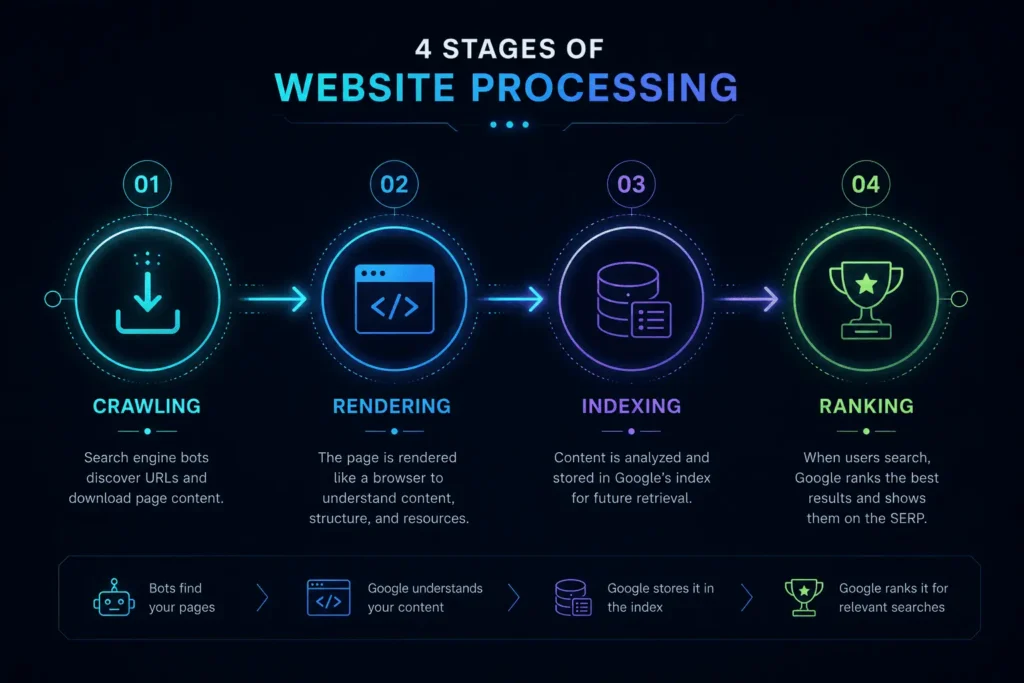
Indexation is the step where Google evaluates a page it has already crawled and decides whether to store it in its searchable index. It sits between crawling and ranking, and it’s the step most business owners never think about — until traffic on a published page stays at zero.
The most common confusion around indexation issues comes from treating “crawling,” “rendering,” “indexing,” and “ranking” as the same thing. They aren’t. Each is a distinct stage with its own controls, and diagnosing an indexation issue starts with knowing which stage is actually failing.
| Stage | What Happens | What Controls It | Where to Check |
| Crawling | Googlebot requests and downloads the page’s code | Server accessibility, robots.txt, crawl budget | Crawl Stats report, server logs |
| Rendering | Google executes JavaScript to see the page as a browser would | JavaScript framework, hydration method, render budget | URL Inspection Tool → Screenshot tab |
| Indexing | Google evaluates the rendered content and decides whether to store it | Content quality, uniqueness, noindex/canonical signals | Page Indexing report |
| Ranking | Indexed pages compete for visibility on specific queries | Relevance, authority, on-page optimization | Search Analytics / Performance report |
This distinction matters strategically:If a page ranks poorly, that’s a relevance problem covered in the Technical SEO guide. If a page doesn’t appear in the index at all, that’s an indexation issue — the subject of this guide.
Why Indexation Issues Matter for the Business
A page that isn’t indexed doesn’t exist for organic search, no matter how well it’s written, how much it cost to produce, or how relevant it is to a buyer’s question. In practice, this shows up as:
- Wasted content investment — articles, landing pages, or product pages published but generating zero organic sessions.
- Invisible new sections — a newly launched blog, resource hub, or service category that never gains traction because most of its URLs sit outside the index.
- Silent site-wide decline — an existing site that gradually loses indexed pages after a migration, redesign, or CMS change, often unnoticed until traffic drops are already significant.
- As highlighted in our State of SEO 2026 Research, technical errors remain a leading cause of unseen traffic loss.
Because indexation problems are invisible in normal analytics (a non-indexed page simply shows no data, rather than an error), they tend to go undiagnosed far longer than crawl errors or broken links. This is why a scheduled indexation check — not just a reactive one — belongs in ongoing technical SEO services and maintenance.
The MS Indexation Diagnosis Framework™
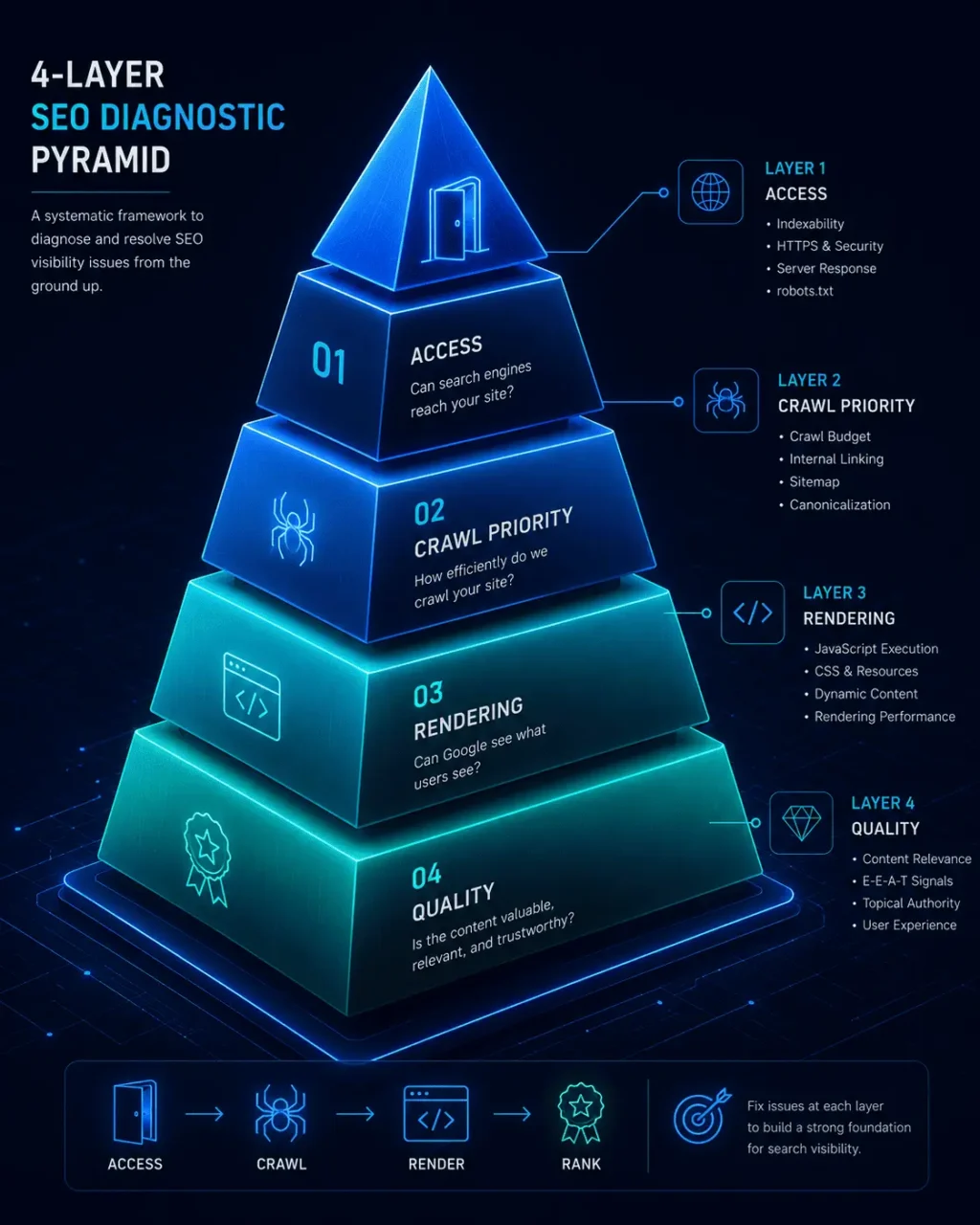
Most guides list indexation causes as a flat, unordered list, which makes prioritization guesswork. The MS Indexation Diagnosis Framework™ instead organizes causes into four layers, matched to the actual order Google’s systems process a URL. Diagnosing top-down, in this order, prevents the most common mistake in indexation troubleshooting: fixing a Layer 4 (Quality) problem when the real blocker sits in Layer 1 (Access).
Layer 1 — Access:
Can Google technically and legally reach this URL at all? Checks: robots.txt disallow rules, noindex tags or headers, canonical tags pointing to a different URL, login walls, redirect loops, incorrect HTTP status codes.
Layer 2 — Crawl Priority:
Is Google choosing to spend crawl budget on this URL? Checks: internal linking depth, orphan pages with no internal links, sitemap inclusion and freshness, server response time, 5xx errors, redirect chains.
Layer 3 — Rendering:
Can Google see the content the way a real visitor would? Checks: JavaScript-dependent content, client-side rendering without server-side rendering or prerendering, content that only loads after a click or scroll interaction.
Layer 4 — Quality:
Does Google consider the content worth storing once it can see it? Checks: thin or duplicate content, low uniqueness relative to similar pages on the site, weak E-E-A-T signals, soft 404 patterns (a page that returns a 200 status but has no meaningful content).
Mapping Google Search Console Statuses to the Framework
To accurately interpret your status data, compare your Search Console reason labels against Google’s Page Indexing report documentation before taking action.
| Page Indexing Report Reason | Diagnosis Layer | What It Usually Means | First Action |
| Blocked by robots.txt | Access | Google is disallowed from crawling the URL | Review and update the robots.txt rule |
| Excluded by “noindex” tag | Access | A noindex directive is intentionally or accidentally present | Confirm intent; remove if unintentional |
| Alternate page with proper canonical tag | Access | The page is correctly deferring to another URL — often not a problem | Verify the canonical target is the intended page |
| Duplicate, Google chose different canonical than user | Access / Quality | Google disagrees with your canonical signal | Strengthen internal linking and content uniqueness on the preferred URL |
| Page with redirect | Access | The URL redirects before it can be indexed itself | Confirm this is intentional |
| Not found (404) / Soft 404 | Access / Quality | The page returns an error, or returns 200 with no real content | Fix broken URLs or add substantive content |
| Server error (5xx) | Crawl Priority | Google couldn’t retrieve the page due to a server issue | Check server logs and hosting stability |
| Discovered – currently not indexed | Crawl Priority | Google knows the URL exists but hasn’t crawled it yet | Strengthen internal links; confirm sitemap inclusion |
| Crawled – currently not indexed | Quality (check Rendering first) | Google crawled the page and decided not to store it | Audit content depth, uniqueness, and JavaScript rendering |
Treat “Discovered – currently not indexed” and “Crawled – currently not indexed” as fundamentally different problems. The first is a crawl-priority signal — Google hasn’t gotten to the page yet. The second is closer to a rejection — Google saw the page and chose not to keep it. Applying a Layer 2 fix (more internal links) to a Layer 4 problem (thin content) rarely resolves the status, and vice versa.
Decision Tree: Diagnosing a Non-Indexed URL
Use this sequence before making any change:
- Open the Page Indexing report and locate the URL. Is it listed as “Indexed”? If yes, the issue isn’t indexation — it’s relevance or ranking, which belongs in the Technical SEO guide.
- If not indexed, read the exact reason label shown. Don’t guess — the label determines the layer.
- If the reason is “Blocked by robots.txt” or “Excluded by noindex tag”: this is a Layer 1 (Access) issue. Check whether the restriction is intentional before removing it.
- If the reason is “Discovered – currently not indexed”: this is a Layer 2 (Crawl Priority) issue. Check internal link depth and sitemap presence before assuming a content problem.
- If the reason is “Crawled – currently not indexed”: start with Layer 4 (Quality) — compare the page’s depth and uniqueness against top-ranking competitors — then check Layer 3 (Rendering) if the page relies on JavaScript.
- If the reason is a redirect, 404, or server error: this is a Layer 1/2 boundary issue — confirm the redirect or error is intentional, then check server stability.
- After fixing the underlying cause, use the URL Inspection Tool to confirm Google’s rendered view now reflects the fix, then request indexing or click Validate Fix.
Common Causes of Indexation Issues
Unintentional noindex tags:
Frequently introduced during staging-to-production migrations, theme changes, or CMS plugin misconfigurations. Always check the rendered HTML, not just the CMS setting — some plugins add noindex at the template level, overriding page-level settings.
Robots.txt over-blocking:
A single overly broad disallow rule (blocking a folder instead of a specific path) can silently exclude an entire content section. Before modifying rules, review the Google Search Central robots.txt specifications to prevent accidentally blocking critical site paths.
Canonical tag conflicts:
When a page’s self-referencing canonical points elsewhere, or when near-duplicate pages compete for the same canonical, Google may choose a different URL to index than the one you intended.
Crawl budget constraints:
Primarily relevant to larger sites (typically tens of thousands of URLs or more). If crawlable URLs exceed what Google is willing to crawl on a given site, lower-priority pages are deprioritized — often surfacing as “Discovered – currently not indexed.”
JavaScript rendering failures:
Content that only appears after client-side JavaScript executes can be missed or delayed if the page isn’t server-side rendered or prerendered. This is a frequent, under-diagnosed cause of “Crawled – currently not indexed,” since the page fetches successfully but the rendered content Google sees may be incomplete. See the JavaScript SEO guide for rendering-specific diagnostics.
Thin or duplicate content:
Pages with minimal unique value — including near-duplicate location pages, tag/archive pages, or auto-generated content — are the most common Layer 4 cause.
Server errors and instability:
Repeated 5xx errors or slow response times during Googlebot’s crawl attempts can cause Google to reduce crawl frequency on the affected paths.
Sitemap misconfiguration. Sitemaps that include noindexed, redirected, or 404 URLs send mixed signals; sitemaps missing important new URLs slow discovery.
How to Fix Indexation Issues: Step-by-Step
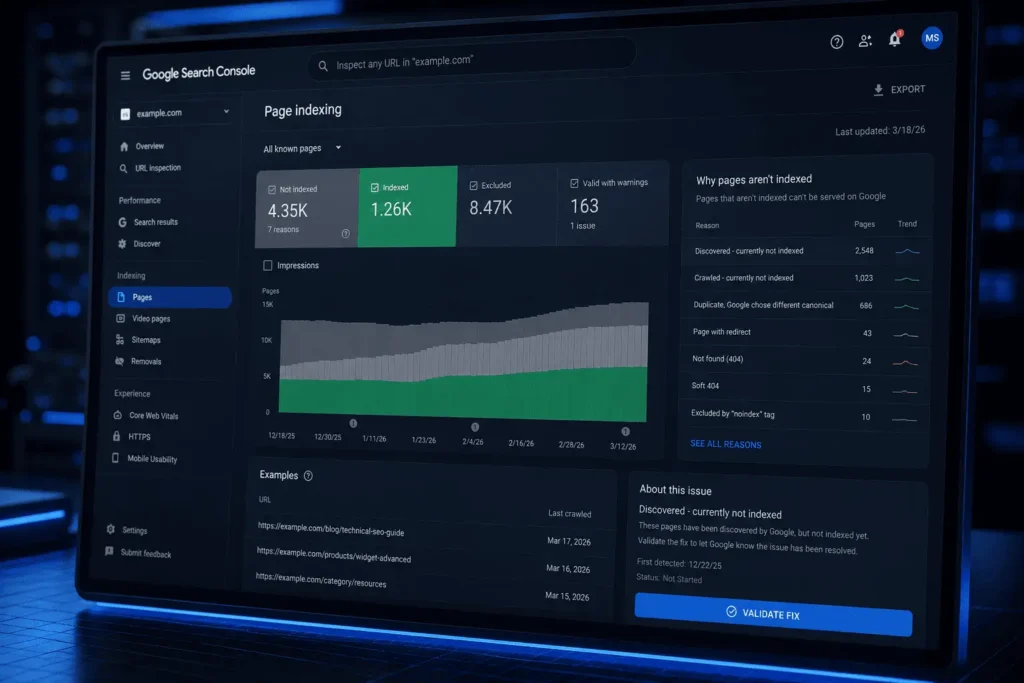
- Export the full Page Indexing report, segmented by reason label — not by page type or URL pattern.
- Group affected URLs by Diagnosis Framework layer using the mapping table above.
- Fix the root cause at the correct layer — don’t apply a generic fix across all non-indexed URLs.
- Re-inspect the fixed URL using the URL Inspection Tool to confirm the live and rendered versions reflect the change.
- Request indexing individually for a small number of high-priority URLs, or rely on sitemap re-crawl for bulk fixes. Manual indexing requests are informally capped at roughly 10–15 URLs per day, so reserve them for priority pages rather than mass-submitting.
- Click “Validate Fix” on the relevant issue category in the Page Indexing report to start Google’s tracking window.
- Wait a full crawl cycle — typically two weeks or more — before re-evaluating. Validation tracks reprocessing; it does not accelerate it.
- Escalate to a full technical SEO audit if the same issue persists across many URLs after a full cycle, which usually signals a structural cause (architecture, crawl budget ceiling, or site-wide content quality pattern) rather than a page-level one.
Download the Website Indexation Checklist
Systematically audit and resolve crawl, rendering, and quality issues across your site with our printable step-by-step PDF workflow.
Download Free Checklist (PDF)Common Mistakes in Indexation Troubleshooting
Assuming the Google Indexing API works for general pages. As outlined in Google’s official Indexing API guidelines
, the API is strictly restricted to pages carrying JobPosting or BroadcastEvent structured data — not blog posts, service pages, or product pages. Submitting general content through it may return a success response without triggering any meaningful crawl priority, and Google’s Search Relations team has stated that unsupported usage isn’t guaranteed to keep working. For general content, sitemap accuracy and internal linking remain the reliable levers.
Mass-submitting “Request Indexing.” Requesting indexing repeatedly for the same URL, or submitting large batches, doesn’t speed up processing and can waste a limited daily allowance that would be better reserved for genuinely new or fixed priority pages.
Treating every non-indexed URL as a problem. Some non-indexed pages are correct by design — internal search result pages, filtered/faceted URLs, thank-you pages, or duplicate parameter URLs often shouldn’t be indexed. Chasing 100% indexation as a vanity metric wastes effort that should go toward priority pages.
Fixing the wrong layer. Adding internal links (a Layer 2 fix) to a page excluded by noindex (a Layer 1 problem) won’t resolve the status. Diagnose the layer before acting.
Expecting “Validate Fix” to accelerate recrawling. The button starts a tracking process on Google’s existing crawl schedule; it does not push the page to the front of the queue.
Best Practices for Long-Term Indexation Health
- Keep XML sitemaps limited to canonical, indexable URLs — remove noindexed, redirected, or error URLs immediately.
- Maintain shallow click-depth (ideally three clicks or fewer from the homepage) for priority pages.
- Review the Page Indexing report on a monthly cadence, not only when traffic drops.
- Set a minimum content-quality bar before publishing, rather than relying on post-publication fixes.
- For JavaScript-heavy sites, implement server-side rendering or prerendering for primary content rather than relying on client-side rendering alone.
- Audit indexation status immediately after any migration, redesign, or CMS change — this is the highest-risk moment for silent noindex or canonical errors.
When Indexation Issues Signal a Deeper Problem
Dealing with Site-Wide or Persistent Indexation Failures?
If dozens of URLs remain unindexed after a full crawl cycle, individual troubleshooting won’t solve the root cause. We evaluate crawl behavior, rendering efficiency, server logs, and content quality together to unblock your site’s organic potential.
Page-by-page troubleshooting works when the affected set is small. When dozens or hundreds of URLs share a status, or when the same fix fails to hold after a full crawl cycle, the cause is usually structural — a crawl budget ceiling, an architecture issue, or a site-wide content-quality signal — rather than something isolated to individual pages. At that point, a full Technical SEO Audit is a more efficient path than continuing to diagnose URLs one at a time, since it evaluates crawl behavior, server logs, rendering, and content patterns together rather than in isolation.
FAQ
Ready to Fix Your Indexation Issues for Good?
Don’t let valuable content sit outside of Google’s search index. Partner with our technical team to identify hidden crawl blockers, optimize render efficiency, and recover your lost organic traffic.
What are indexation issues? Indexation issues are technical or content-related problems that prevent a search engine from adding an eligible webpage to its index, meaning the page cannot appear in search results regardless of its content quality or relevance.
Why are my pages not indexed on Google? The most common causes are unintentional noindex tags, robots.txt restrictions, canonical tags pointing elsewhere, insufficient crawl priority, JavaScript rendering gaps, or content Google judges too thin or duplicate to store. The exact reason is shown in the Page Indexing report in Google Search Console.
What is the difference between crawling and indexing? Crawling is Googlebot downloading a page’s code. Indexing is a separate, later step where Google evaluates the rendered content and decides whether to store it in the searchable index. A page can be crawled without ever being indexed.
How long does it take Google to index a page in 2026? There’s no fixed timeline. New pages on established, well-linked sites are often indexed within days; pages on newer or lower-authority sites, or pages with quality concerns, can take considerably longer or remain unindexed until the underlying issue is fixed.
Does clicking “Validate Fix” speed up indexing? No. Validate Fix starts Google’s tracking of whether an issue category has been resolved, based on Google’s normal crawl schedule. It does not push the page into a faster queue.
Can I use the Google Indexing API to index blog posts faster? Not effectively. The Indexing API is officially limited to pages with JobPosting or BroadcastEvent structured data. For ordinary content, accurate sitemaps, strong internal linking, and the manual Request Indexing feature are the appropriate tools.
Is it a problem if some of my pages aren’t indexed? Not necessarily. Pages like internal search results, duplicate parameter URLs, or thank-you pages are often correctly excluded. The priority is ensuring your commercially or strategically important pages are indexed — not achieving 100% indexation across every URL on the site.