On-page SEO optimization is tuning a page’s content and HTML so search engines understand its topic and relevance. It covers title tags, headings, body content, meta, images, structured data, internal links, and signals that match user intent.
This page is for site owners, SEOs, and content managers who control page-level content and HTML. If you need a full technical crawl audit, that’s a different discipline — see technical SEO instead.
What Exactly Is On-Page SEO Optimization?
On-page SEO optimization is tuning a page’s content and HTML so search engines understand its topic and relevance. It covers title tags, headings, body content, meta, images, structured data, internal links, and signals that match user intent.
On-page SEO is one of three SEO disciplines, and it’s the only one you fully control. Off-page SEO is what other sites say about you — links, mentions, citations. Technical SEO is how well a search engine can crawl and render your site at scale — server speed, site architecture, indexing rules. On-page SEO is everything on the page itself: the words, the tags, the structure.
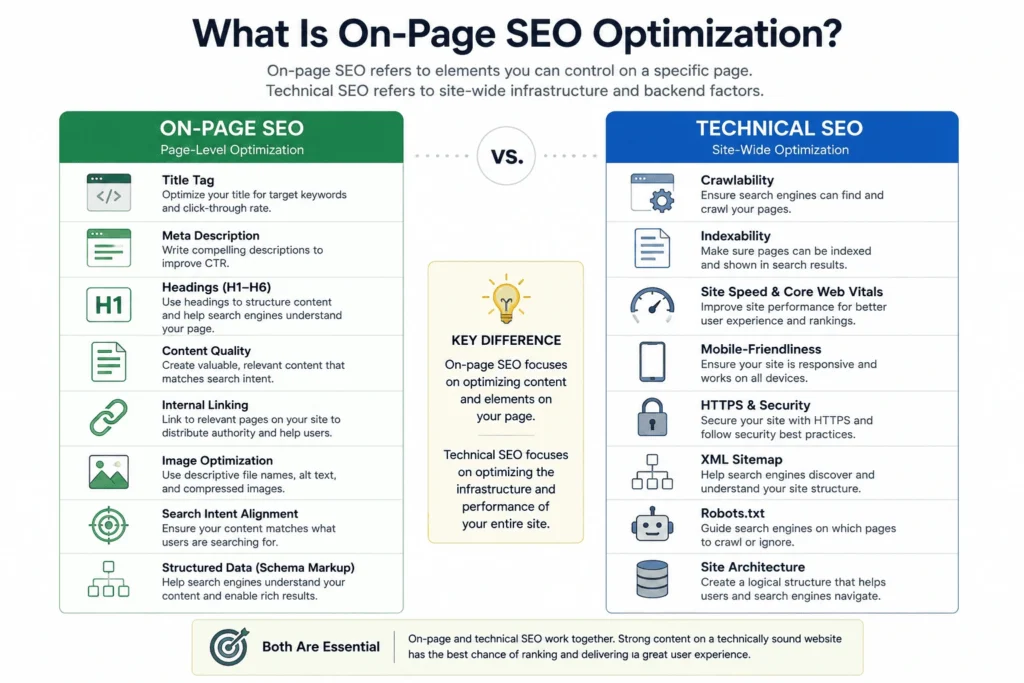
That distinction matters because “on-page SEO optimization” gets used as a catch-all in a lot of agency pitches. It isn’t one. It’s a specific layer of work, and it has a ceiling. A page with perfect on-page work can still fail to rank if the site around it is slow or poorly structured — that’s what How Do I Measure On-Page SEO Results and When Should On-Page SEO Stop cover later on this page.
Google’s own documentation on how Search works, from crawling to indexing to ranking, treats content and HTML signals as one input among several — not the whole system. [CITATION NEEDED: Google Search Central — How Search Works]
If you want the execution side of this handled for you rather than doing it yourself, that’s MS’s on-page SEO service — but this page is the diagnostic version: what to check, and why, before you spend money fixing it.
Why Does On-Page SEO Matter for Organic Traffic?
On-page SEO decides whether your page satisfies a user’s query. If content aligns with intent and HTML signals are clear, search engines index and rank it. Poor on-page work wastes backlinks and technical fixes.
Here’s the situation most site owners miss: on-page problems don’t stay contained to the page. A backlink pointing at a page that doesn’t answer the query it ranks for is a wasted backlink. A fast, well-architected site with thin, mismatched content on its money pages is a wasted technical SEO budget. On-page SEO is the layer that makes every other investment usable.
This connects directly to what Google calls E-E-A-T — Experience, Expertise, Authoritativeness, Trustworthiness. It’s not a ranking factor you can tick off with a plugin. It’s a lens Google’s own human quality raters use to judge whether a page was written by someone who actually knows the subject, and it shows up in how specifically a page answers a question versus how generically it restates one. [CITATION NEEDED: Google Search Quality Rater Guidelines]
The other half of this is search intent — matching what the searcher actually wants, not just what keyword they typed. We cover that next, because it’s the decision that everything else on this page depends on.
How Do I Match On-Page Content to Search Intent?
Identify the dominant intent — informational, transactional, or navigational. Then shape headings, content depth, and calls-to-action to match. Use SERP analysis and top-ranking pages for evidence, not guesses.
Here is the plan for doing this without guessing: open an incognito browser, search your target keyword, and look at what’s already ranking on page one. If eight of the top ten results are long-form guides, the intent is informational — a product page won’t outrank them no matter how well you optimize it. If most results are product or pricing pages, the intent is transactional, and a guide will underperform.
| Search Intent Type | What the Searcher Wants | Content Format That Satisfies It | Example Query |
| Informational | To learn or understand something | Guide, explainer, how-to | “how does on-page SEO work” |
| Navigational | To find a specific site or page | Homepage, brand/service page | “MS on-page SEO service” |
| Transactional | To buy or take an action now | Product page, pricing page, service page | “hire an on-page SEO agency” |
| Commercial investigation | To compare options before deciding | Comparison page, review, case study | “best on-page SEO tools” |
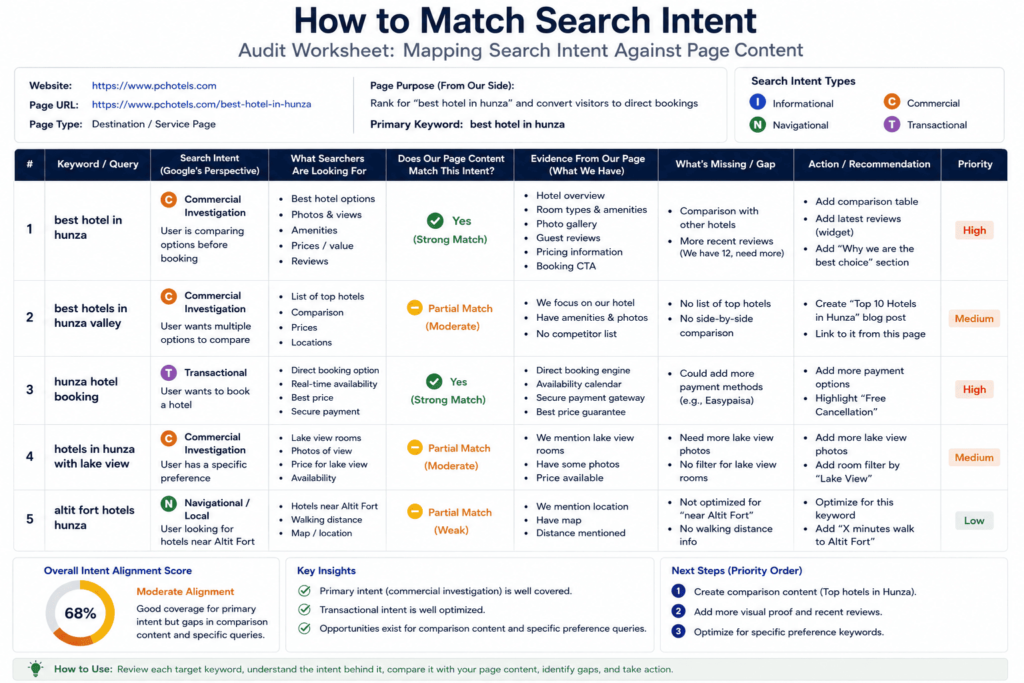
Getting this wrong is one of the most common on-page mistakes we see: well-written content, aimed at the wrong intent, that will never rank no matter how many times you rewrite the title tag.
If you’re still building your keyword list before you get to intent-matching, free keyword research tools is worth reading first — it covers how to find the terms this section assumes you already have.
What On-Page Elements Have the Biggest Ranking Impact?
Title tag, heading structure, body content relevance, internal links, and page performance are highest-impact elements. Structured data and meta descriptions affect presentation and click-throughs, per Google’s own documentation, but not direct rank.
That distinction — rank versus click-through — gets blurred constantly in SEO advice, so it’s worth being precise about it. Some elements tell Google what your page is about and whether to rank it. Other elements only affect whether someone clicks it once it’s already on the results page. Confusing the two leads to wasted effort: polishing a meta description won’t fix a page that isn’t ranking to begin with.
Highest-impact for ranking, roughly in order:
- Title tag — the single strongest on-page relevance signal you control directly
- Heading structure and body content — whether the page actually covers the topic in depth
- Internal links — whether the rest of your site tells search engines this page matters
- Page performance — whether the page loads fast enough that users (and crawlers) stick around
Affects presentation, not rank directly:
- Meta description — improves click-through rate, does not influence position
- Structured data — improves how a result looks (rich snippets), doesn’t move rank on its own
This connects to broader site authority too — a single perfectly optimized page still competes inside the context of your whole domain’s authority, which is a separate, longer-term lever.
How Do I Write Effective Title Tags and Meta Descriptions?
Put the core query and a unique value in the title, keep it descriptive and under recommended lengths. Write meta descriptions that clarify the page’s promise to increase click-through rate; they don’t directly influence rank.
Title tags. Lead with the term someone actually searches, not a clever phrase. Keep it specific enough that it’s obviously different from every other page on your site — duplicate or near-duplicate titles across a site is one of the most common on-page failures we see in audits, and it’s invisible to the person who wrote them because each page looks fine in isolation.
Meta descriptions. This is your one shot at a pitch inside the search results. Write it like ad copy for your own content: state the specific value the page delivers, not a restatement of the title. Google sometimes rewrites your meta description in the results anyway if it decides a snippet from the page matches the query better — that’s expected behavior, not a failure on your part.
Common mistakes worth naming directly:
- Keyword-stuffed titles that read like they were written for a robot, not a person
- Meta descriptions left blank, letting Google auto-generate one from body text
- The same title tag template copy-pasted across dozens of pages with only the product name swapped
Once titles and meta are in shape, writing SEO-friendly articles covers the body content that has to back up what the title promises. [CITATION NEEDED: Google Search Central — title link documentation]
How Should I Structure Content with Headings (H1–H6)?
Use one H1 for the main topic, H2s for major sections, and H3+ for subtopics. Headings must be descriptive and match searcher intent. They create a clear content hierarchy for readers and crawlers.
The single-H1 rule still matters, even though some frameworks and CMS themes get sloppy about it. One H1 per page tells both readers and crawlers, unambiguously, what this page is fundamentally about. Everything under it — H2s, H3s — should nest logically, the way this page’s own structure does: fourteen H2 questions, each a complete sub-topic, none of them competing with the H1 for “what is this page about.”
Write headings the way you’d write a good 40-word answer: specific enough to stand alone. A heading like “More Info” tells a crawler nothing. A heading phrased as the actual question a reader has — which is the format this entire page uses — tells both a human skimmer and an AI retrieval system exactly what’s in the section below it.
For the mechanics of writing the body content underneath those headings so it stays scannable rather than dense, structuring rich, scannable body content goes deeper than heading hierarchy alone. [CITATION NEEDED: W3C HTML specification — heading elements]
How Do I Use Internal Links and Anchor Text Correctly?
Link to related pages with descriptive anchor text that reflects the target page’s topic. Limit links per page to useful navigation. Avoid over-optimized exact-match anchors that look manipulative.
Internal linking is the part of on-page SEO most agencies treat as an afterthought — a related-posts widget bolted on at the bottom of the page. Done properly, it belongs in the body copy, at the moment a claim or topic naturally calls for it, with anchor text that describes the destination rather than repeating the same exact phrase every time it’s used.
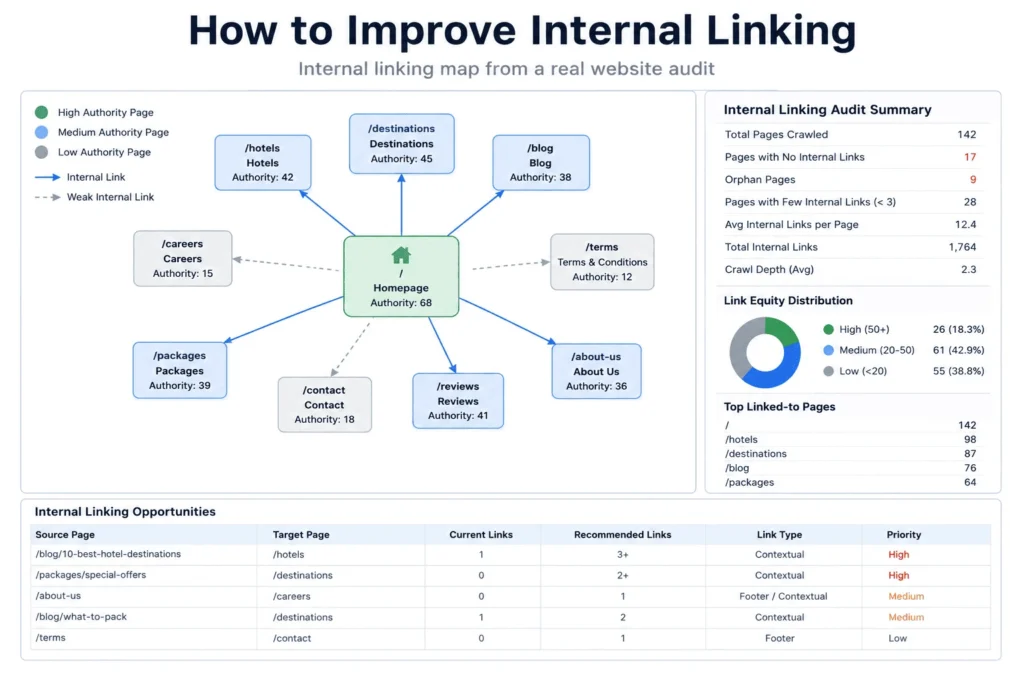
Two failure modes we see constantly in audits: too few internal links, so new or updated pages sit orphaned with no path for a crawler — or a reader — to find them; and anchor text so heavily exact-match (“on-page SEO optimization services” every single time) that it reads as manipulative rather than helpful. Vary the anchor text. Point it at pages that are actually relevant to the sentence it sits in.
Here Is the Situation, the Evidence, and the Limitation
Most agencies sell “on-page SEO” as a one-time setup fee: change your meta titles, compress a few images, invoice you, move on. Here’s the commercially inconvenient part of that pitch — basic on-page optimization is largely a free commodity now. Modern CMS platforms and plugins handle meta title fields, basic image compression, and alt text prompts by default. If an agency’s entire on-page deliverable stops there, you’re paying thousands of dollars for what your CMS already does for free.
The work that actually moves the needle is structural: internal link architecture that isn’t an afterthought, and entity alignment that helps both search engines and AI retrieval systems understand what a page is actually about. That’s less glamorous than a content rewrite, and it’s harder to sell as a line item — which is probably why it gets skipped.
Here’s what we can show you from our own work, and here’s exactly how far that evidence goes.
When we audited a boutique hospitality property’s website, one of the clearest findings was a mobile Core Web Vitals failure: Largest Contentful Paint (LCP) measured at 4.8 seconds — a fail against Google’s threshold — before any on-page changes were made.
| Metric | Before | After | Tool Used |
| Mobile LCP | 4.8s (fail) | 1.8s (pass) | PageSpeed Insights |
[CITATION NEEDED: internal audit reference — date range and PageSpeed Insights report to be attached before publish]
That improvement came from on-page-side changes — image sizing and script loading on the affected pages — not a server migration or hosting change, which is why it’s fair to count as on-page work rather than technical SEO. We’re not going to generalize this into “on-page fixes will cut your LCP by X seconds” — that’s one property, one sector (boutique hospitality), one CMS, over one audit period. We didn’t isolate this result from seasonal demand changes on that property, and a single case doesn’t establish a rate you should expect on a different site with a different starting point.
We are not including booking-ratio, revenue, or AI-citation figures for this engagement on this page. We have those internally, but they’re not yet backed by a document we’re willing to stand behind publicly — a Search Console export, a client-confirmed revenue figure, a named and repeatable method for measuring AI citation share. Publishing a number we can’t show our work on would be the fastest way to undermine the entire point of this page. When that documentation is ready, this section gets the fuller picture. Until then, this is what we can actually show you.
How Do Structured Data (Schema.org) and Canonical URLs Affect On-Page SEO?
Structured data helps search engines interpret content and enables rich results. Canonical URLs prevent duplicate-content issues and clarify which page should appear in search. Both reduce indexing confusion.
Structured data, built using the Schema.org vocabulary and typically implemented as JSON-LD in your page’s HTML, doesn’t change your ranking directly. What it does is give search engines an explicit, machine-readable description of what’s on the page — this is a recipe, this is a review, this is an FAQ — which is what makes rich results (star ratings, FAQ dropdowns, and similar SERP features) possible.
Canonical URLs solve a different problem: when the same or near-identical content is reachable at more than one URL (common with filtered category pages, printer-friendly versions, or syndicated content), a canonical tag tells search engines which version is the “real” one to index and rank. Skip it, and you risk splitting ranking signals across duplicate versions of the same page — a form of self-inflicted crawlability and indexability confusion.
For the mechanics of implementing structured data correctly, a full schema markup checklist covers the setup step by step. [CITATION NEEDED: Schema.org specification]
| Discipline | What It Owns | Who Typically Handles It | Handoff Signal |
| On-page SEO | Content, HTML tags, headings, internal links, images | Content team, SEO, site owner | Content and intent are aligned but rankings still lag |
| Technical SEO | Crawlability, indexability, site speed at scale, server config | Developer, technical SEO specialist | Site can’t be crawled/indexed efficiently, or performance issues are site-wide |
| Off-page SEO | External links, mentions, citations, brand signals | SEO, PR, outreach | Content and technical are solid but domain lacks authority signals |
How Do Page Performance and Core Web Vitals Relate to On-Page Changes?
Core Web Vitals measure user experience — loading, interactivity, visual stability. On-page changes like image sizing, scripts, and layout directly affect these metrics and can influence rankings indirectly through user behavior.
Core Web Vitals are a set of specific, measurable metrics Google uses to quantify real-world user experience — not a vague “make it feel fast” instruction. The metric that on-page work most directly influences is Largest Contentful Paint (LCP): how long it takes the biggest visible element on the page to load. Oversized images, render-blocking scripts, and unoptimized layout all push this number up, and all of them are things a content or on-page team can fix without touching a server.
This is also where on-page work runs into its ceiling. If your images are compressed and your layout is clean but the page is still slow, the bottleneck has likely moved from on-page to something structural — hosting, caching, theme bloat — which is technical SEO territory, not on-page. Speeding up a WordPress site is the deeper resource for that layer, once you’ve confirmed the slowdown isn’t coming from the on-page side. [CITATION NEEDED: web.dev — Core Web Vitals documentation]
How Do I Measure On-Page SEO Results with Google Search Console and PageSpeed Insights?
Use Google Search Console for clicks, impressions, CTR, and query positions. Use PageSpeed Insights and Lighthouse for performance and Core Web Vitals. Combine both to link content changes with behavior shifts.
Google Search Console is where you confirm whether an on-page change actually did anything — not opinion, the actual query data: did impressions or clicks move for the query you were targeting, did your average position shift, did click-through rate change after you rewrote a title or meta description.
PageSpeed Insights and Lighthouse measure the performance side — Core Web Vitals scores, opportunities for improvement, and a diagnostic breakdown of what’s slowing a specific page down.
The mistake we see most often here isn’t using the wrong tool — it’s checking too early. Give Google Search Console at least a few weeks of data after a change before drawing a conclusion; ranking and impression data is noisy day to day and can mislead you into thinking a fix worked (or didn’t) based on normal fluctuation.
For a broader structured approach to running this kind of check across a whole site rather than one page at a time, running a structured audit workflow covers that process.
What Advanced On-Page Techniques Improve Content Relevance and Rich Results?
Use structured data, entity-aware headings, topical clustering, content hubs, and context-rich internal linking. Test FAQ/HowTo schema where appropriate. Track whether rich snippets appear after implementation.
Once the fundamentals above are handled, the next layer of on-page work is about depth and connection rather than individual-page fixes:
- Topical clustering — grouping related content into a pillar-and-cluster structure (this page is an example of a pillar; the linked pages throughout are the cluster) so a search engine sees comprehensive coverage of a topic, not one isolated page
- Entity-aware headings and content — writing in a way that names the actual tools, standards, and concepts involved (which is what the entity list running through this page is doing) rather than relying on vague synonyms
- FAQ or HowTo schema — worth testing on pages with a genuine question-and-answer or step-by-step structure, since it can unlock additional SERP real estate
Track whether these changes actually produce rich results using Google Search Central’s rich results testing tools — don’t assume a schema addition worked without confirming it. [CITATION NEEDED: Google Search Central — rich results test]
This is also the natural place to flag generative search engines specifically — optimizing for generative search engines covers how these same on-page fundamentals (clear structure, self-contained answers, named entities) apply when the “search engine” is an AI system summarizing or citing your page rather than a traditional results list.
Diagnostic table — use this before you start fixing anything:
| Symptom | Likely Cause | What to Check First |
| Page ranks but gets few clicks | Weak title tag or meta description | Rewrite title/meta, check CTR in Search Console after 2–4 weeks |
| Page doesn’t rank at all despite good content | Intent mismatch | Compare your content format against what’s actually ranking on page one |
| Rankings dropped after a redesign | Technical issue, not content | Check crawlability, indexability, and Core Web Vitals before touching copy |
| Page ranks low on a fast, well-linked site | Thin or shallow content | Compare depth and entity coverage against top-ranking competitors |
| Everything on-page looks correct but nothing improves | Site-wide technical ceiling | Escalate to a technical SEO audit — this is beyond on-page’s reach |
How Do I Optimize Images and Alt Text for Accessibility and Ranking?
Use descriptive, concise alt text that explains images for users and crawlers. Serve appropriately sized formats, add width/height attributes, and use responsive images to improve load time and relevance signals.
Write alt text for the person who can’t see the image first — screen reader users depend on it to understand your page. That it also gives search engines context about the image is a secondary benefit, not the primary reason to do it well. “Image of hotel room” is not useful to either audience. “King-size bed hotel room with mountain view, Skardu” describes the actual content.
On the performance side: serve images in modern, compressed formats, set explicit width and height attributes so the browser doesn’t shift layout while loading (a Core Web Vitals factor — Cumulative Layout Shift), and use responsive images so a phone isn’t downloading a desktop-sized file.
If image and asset optimization is part of a larger site build or redesign rather than a one-page fix, planning development work in phases covers how to sequence that without breaking what’s already working.
When Should On-Page SEO Stop and Technical SEO Begin?
Stop on-page work when content intent, structure, and signals are aligned. If pages still underperform, pivot to technical SEO — crawlability, indexability, canonicalization, server response, and site architecture checks.
This is the handoff point most agencies blur on purpose, because on-page work is easier to sell as an ongoing content retainer than a one-time technical fix is. Here’s the practical signal: if you’ve matched intent, written a clear title and meta, structured your headings properly, linked internally, optimized images, and the page still isn’t ranking or isn’t being indexed at all — the problem probably isn’t on the page anymore.
At that point, check crawlability (can search engines reach the page at all — robots.txt, internal link paths), indexability (is the page actually eligible to appear in search results, or is it blocked by a noindex tag or canonical pointing elsewhere), and canonicalization (is a duplicate version of this page competing with it for the same ranking signals).
Knowing this boundary protects your budget — it’s the difference between paying for more content and paying for a two-hour technical check that finds the actual problem. MS’s technical SEO service is where that diagnostic work happens once you’ve ruled out the on-page side.
What Practical On-Page SEO Checklist Should I Run Before Publishing?
Confirm intent match, unique title and meta, one H1, logical H2s, internal links, descriptive image alt text, structured data where applicable, canonical set, and performance tested for Core Web Vitals.
Run this before you hit publish on any page:
- [ ] Confirmed the dominant search intent and matched content format to it
- [ ] Unique title tag, under recommended length, leads with the actual query
- [ ] Unique meta description written for click-through, not keyword-stuffed
- [ ] One H1, logical H2/H3 nesting underneath it
- [ ] Internal links placed in body copy with varied, descriptive anchor text
- [ ] Images have descriptive alt text and are properly sized/compressed
- [ ] Structured data added where genuinely applicable (not forced onto every page)
- [ ] Canonical tag set correctly, especially on any near-duplicate content
- [ ] Mobile Core Web Vitals tested via PageSpeed Insights before publishing
For questions this checklist doesn’t cover, answers to common on-page SEO questions is the next stop.
Frequently Asked Questions
How long does it take to see ranking changes after on-page fixes? There’s no fixed timeline we’d put a number on without data behind it. Give Google Search Console at least a few weeks of fresh data before judging whether a change worked — shorter than that, and normal ranking fluctuation will mislead you either direction.
Do meta descriptions affect Google rankings directly? No. They affect click-through rate — whether someone clicks your result once it’s already showing — not whether Google ranks the page in the first place.
How many internal links should a single page have? There’s no universal number. The right count depends on how many genuinely relevant pages exist to link to. The goal is useful navigation for a reader, not hitting a quota.
Does image alt text actually help SEO, or just accessibility? Primarily accessibility — it’s how screen readers describe images to users who can’t see them. Any SEO benefit is secondary to that purpose, not the reason to prioritize it.
What’s the difference between a canonical tag and a redirect? A canonical tag tells search engines which version of similar content to index while both versions stay live. A redirect sends users and crawlers to a different URL entirely, and the original stops resolving.
Can on-page SEO fix a page that isn’t getting any traffic at all? Sometimes — if the cause is a mismatched title, weak content, or wrong intent. If the page isn’t indexed at all, that’s a crawlability or indexability problem, and on-page work won’t fix it until the technical issue is resolved first.
Does page speed count as on-page SEO or technical SEO? Both, depending on the cause. Image and script bloat on a specific page is on-page. Server response time, hosting, and site-wide caching are technical SEO.
How often should I update on-page elements on an existing page? There’s no fixed schedule we’d recommend without knowing your specific page’s performance data. Revisit a page when its rankings or click-through rate drop, or when the content it’s competing against in search results has clearly moved ahead.
Next step: if you’ve worked through this page and want a structured way to apply it, download MS’s on-page SEO checklist — the same list above, formatted as a standalone reference you can run against any page before you publish it.