
Site Migration Without Losing Rankings: The Complete SEO Guide (2026)
Site migration without losing rankings means planning, executing, and validating a change to a website’s domain, platform, URL structure, or architecture in a way that preserves crawlability, indexation, and the ranking signals search engines and AI systems already associate with the old site. The rankings aren’t transferred automatically — they’re preserved by how carefully the migration is mapped, redirected, and verified. Most migrations don’t fail because a rule was unknown. They fail because a step was skipped under deadline pressure.
This guide walks through the full process: what actually breaks rankings during a migration, a six-stage framework for controlling the risk, and what to do if rankings drop anyway.
What “Site Migration” Actually Means
“Migration” gets used loosely. In practice, Google’s own site-move documentation groups URL-changing migrations into seven distinct scenarios, and the distinction matters because each one carries a different level of risk and requires a different level of process.
| Migration type | What changes | Relative risk |
| Protocol change (HTTP → HTTPS) | Only the URL scheme | Low |
| Hostname change (www ↔ non-www) | Subdomain prefix | Low–Medium |
| Subdomain or subdirectory change | Where content lives on the same domain | Medium |
| Site structure change | URL paths, categories, taxonomy | Medium–High |
| Domain change | Entire root domain | High |
| CMS platform change | Underlying system generating the URLs | High |
| Full site replacement / consolidation | Multiple factors at once, often merging sites | Highest |
Two things worth noting before you plan anything:
First, real-world migrations are almost never one of these in isolation. A brand moving to a new domain while also relaunching on a new CMS is executing a domain change, a platform change, and usually a URL restructure simultaneously — which means the checklist has to cover all three at once, not whichever one feels most obvious.
Second, a “redesign” that keeps the same URLs isn’t a migration in the SEO sense — no ranking signals are at risk because nothing search engines index has changed. The risk is specifically tied to URL changes, content removal, or platform-level rendering changes. If your project doesn’t touch any of those, most of this guide doesn’t apply to you.
Why Migrations Break Rankings
Rankings aren’t stored against a domain the way a bank balance is stored against an account number. They’re the output of hundreds of accumulated signals — internal and external links pointing at a specific URL, historical crawl and click behavior at that URL, structured data tied to that URL, content that satisfies a specific query at that URL. Change the URL, the platform, or the content without preserving those signals, and the signals don’t move with it. They simply stop applying.
The specific failure points are consistent across almost every migration MS has audited:
- Missing or wrong redirects. A URL that returns a 404 instead of a 301 tells search engines the page is gone, not moved. A redirect pointing to an unrelated or generic page (a “soft 404 by redirect”) passes a fraction of the original signal, if any.
- Redirect chains and loops. Each additional hop in a redirect chain adds crawl cost and dilutes signal. Chains of three or more hops are a common byproduct of migrating twice without cleaning up the first migration’s redirects.
- Orphaned internal links. If internal links still point to old URLs instead of being updated to point directly at the new ones, you’re relying entirely on redirects to carry every internal link’s worth of equity — redirects that can be missed, mistyped, or removed later without anyone noticing.
- Canonical tag mismatches. If canonical tags on the new site still reference old URLs, or are missing entirely, you can end up telling search engines to treat the new pages as duplicates of pages that no longer exist.
- Crawl budget waste. A migration that leaves both the old and new URL sets crawlable and unredirected forces search engines to spend crawl budget re-discovering the same content twice, slowing indexation of the pages that matter.
- Lost or altered structured data. Schema markup frequently doesn’t survive a CMS migration because it was hardcoded in the old template and never rebuilt in the new one.
- Content parity gaps. Pages that get “refreshed” during the migration — shorter copy, removed sections, different headings — are no longer the same page that earned the ranking, even if the URL redirects correctly.
None of these are exotic. They’re the predictable result of treating a migration as a development project with an SEO checklist attached at the end, instead of an SEO-governed project with development attached.
The MS Website Migration Preservation Framework™
MS runs every migration — client or internal — through six sequential stages: Audit → Mapping → Migration → Validation → Monitoring → Recovery. Each stage exists because skipping it creates a specific, predictable failure downstream. The framework isn’t a checklist you can reorder to fit a deadline; the order is the point.
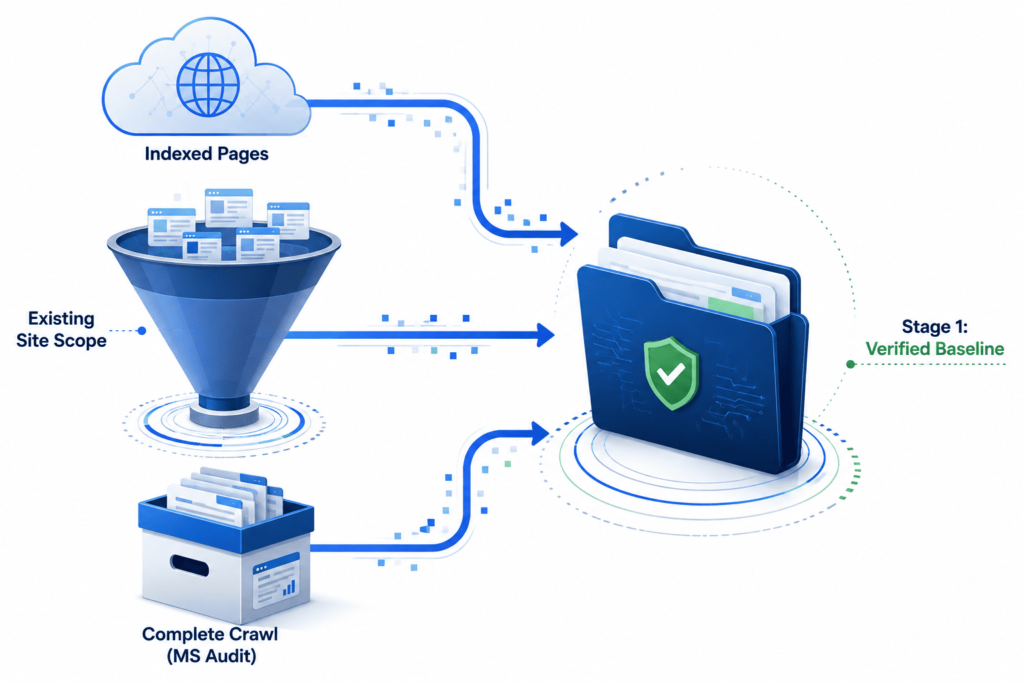
Stage 1 — Audit: capture the “before,” or the migration is unprovable
Before a single URL changes, document the current state completely. If this step is skipped, there is no way to know whether the migration succeeded, and no way to diagnose what broke if it didn’t.
Capture and store, with a date stamp:
- Full crawl of the existing site (broken links, redirect chains already in place, duplicate titles/meta, orphaned pages, missing structured data)
- Complete list of indexed URLs (Google Search Console → Pages report, plus a site: search as a sanity check)
- Top pages by organic traffic and by referring links — these are the pages that carry the most risk and need the most attention in mapping
- Current rankings for priority queries
- Core Web Vitals baseline (field data from PageSpeed Insights / CrUX, not lab data alone)
- Existing structured data implementation, page by page
- Google Analytics baseline: sessions, conversions, and the specific events tied to revenue on the current site
This is the single highest-leverage hour of the entire migration. Everything in Validation and Recovery depends on having something accurate to compare against.
Stage 2 — Mapping: the step most migrations skip under deadline pressure
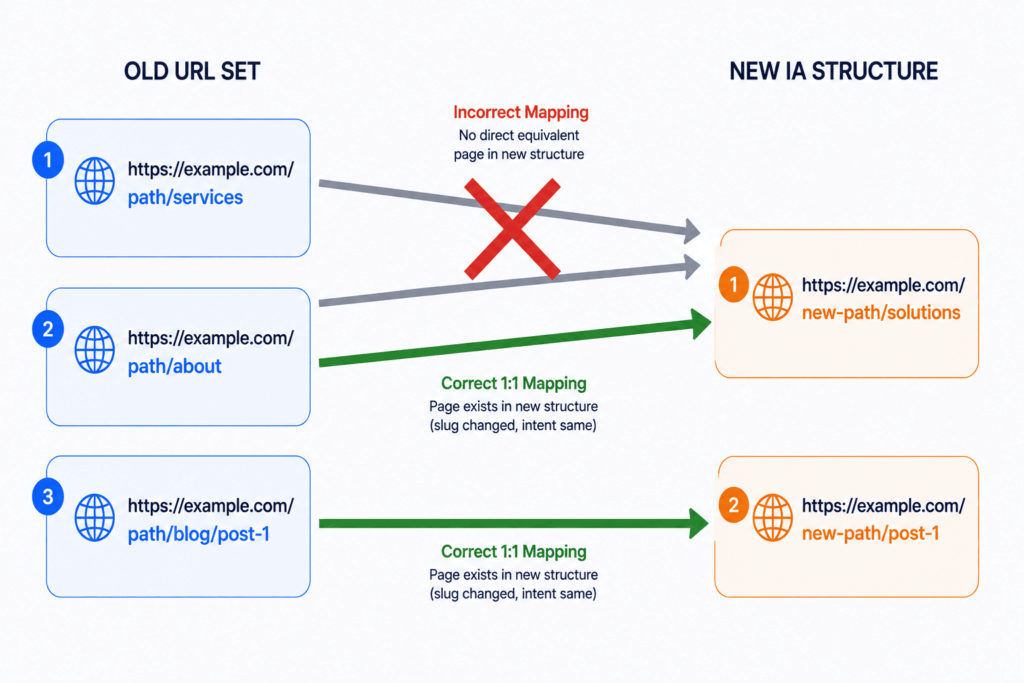
Mapping means building a 1:1 relationship between every existing URL and its destination after migration. Not a redirect rule that catches “most” URLs — an explicit mapping for every URL that currently has traffic, links, or indexation.

| Old URL | New URL | Redirect type | Priority |
| Has direct equivalent content | New URL for that same content | 301 | High |
| Content consolidated into another page | The page it’s being merged into | 301 | High |
| Content genuinely discontinued, no replacement | Closest relevant category or a clear 410/404 | 301 (to category) or 410 | Medium |
| Duplicate or near-duplicate of another page | The canonical version | 301 | Medium |
| Low-value, no traffic, no links, no indexation | Can be left to 404 | — | Low |
Three rules govern this stage:
- Every redirect is a decision, not a default. A blanket rule like “redirect everything to the homepage” is functionally the same as deleting every page — it signals to search engines that none of the destination content matches the original intent, and it will read as a soft 404 pattern across the site.
- Map to the most relevant equivalent, not the closest URL match. Automated 1:1 pattern-matching (old-path → new-path with the same slug) breaks the moment your information architecture changes, which is usually the entire reason for the migration in the first place.
- Resolve chains before launch. If a URL has already been redirected once in a previous migration, map the redirect directly to the final destination — never redirect A → B → C when A → C accomplishes the same thing with one less hop.
Canonical tags get mapped in the same pass: every new URL needs a canonical tag pointing to itself (the new URL), and any legacy canonical references to the old domain or old URL structure need to be swept and corrected before launch.
Stage 3 — Migration: execution day
By the time you reach execution, the decisions should already be made — this stage is about disciplined implementation, not improvisation.
- Redirects go live at launch, not after. Every mapped redirect from Stage 2 should be active the moment the new site is live, not rolled out progressively.
- XML sitemap is rebuilt in advance and submitted on day one. It should contain only new URLs — no legacy paths, no redirected URLs, no unpublished drafts.
- Robots.txt gets checked twice. Once to confirm the staging environment’s disallow rules aren’t accidentally carried into production, and once to confirm the production robots.txt isn’t blocking the sections search engines need to recrawl.
- Structured data is rebuilt in the new templates, not assumed to carry over. Validate it against the live URLs, not the staging environment.
- Internal links are updated to point directly at new URLs. Relying on redirects to catch internal links is a temporary patch, not a permanent solution — it adds a hop to every internal link on the site indefinitely.
- Domain-level changes require the Change of Address tool in Search Console, submitted for the specific property being moved. As of Google’s June 2026 update to its site-move documentation, this now needs to be submitted separately for every verified subdomain variant of the old domain — the www version, the non-www version, and any other subdomains that were indexed — not just the primary property. A property that’s indexed but was never verified in Search Console can’t have a Change of Address submitted for it, which is a gap worth auditing for before migration day, not after.
- Hreflang annotations, if the site serves multiple regions or languages, get rebuilt against the new URL set and cross-checked for reciprocity (every hreflang reference needs a matching return reference on the target page).
Stage 4 — Validation: the 48–72 hours after launch
Validation is not “check that the site looks right.” It’s a systematic comparison against the Stage 1 baseline.
- Crawl the new site and compare against the Stage 1 crawl. Every high-priority URL from the old crawl should resolve through exactly one redirect hop to its mapped destination, or exist directly at the new URL.
- Spot-check status codes on the highest-traffic and highest-linked URLs first — these carry the most risk if something was missed.
- Use the URL Inspection tool in Search Console on priority pages to confirm Google can fetch and render the new URL correctly.
- Confirm the new sitemap has been fetched and check the coverage report for a spike in “Discovered — not indexed” or “Crawled — not indexed,” which usually signals a technical issue rather than a content issue this early.
- Check Core Web Vitals field data on the new environment against the Stage 1 baseline — a new CMS or theme is a common source of regression here.
- Review server log files if you have access — this confirms whether search engine crawlers are actually hitting the new URLs and receiving the expected response codes, which is more reliable than inferring crawler behavior from Search Console alone.
Stage 5 — Monitoring: weeks 1–12
Migrations don’t resolve in 48 hours. Expect a temporary dip in visibility as search engines re-crawl and re-evaluate the new URL set — this is normal and distinct from an actual migration failure (more on telling the two apart in Stage 6).
- Weekly Search Console performance review against the Stage 1 baseline, watching impressions and average position on priority queries, not just clicks.
- Coverage report monitoring for indexation errors that appear after the initial validation window — these often surface in week 2 or 3 as search engines work through the full crawl queue.
- Search Console’s dedicated Generative AI performance report, launched in June 2026, is worth checking alongside standard performance data. It reports impressions inside AI Overviews and AI Mode separately from standard organic data — useful for confirming your priority pages are still being surfaced in AI-driven results post-migration, though as of this writing the report is still in phased rollout, shows impressions only, and doesn’t yet include click or query-level data, so treat it as a visibility signal, not a complete picture.
- Crawl stats report to confirm Googlebot’s request volume on the new site is comparable to its historical crawl rate on the old one — a sudden drop can indicate a crawlability problem the coverage report hasn’t caught yet.
Stage 6 — Recovery: if rankings drop and don’t recover
A short-term dip is expected. A recovery failure is not the same thing, and the two are diagnosed differently.
Normal pattern: a visible dip in the first 1–3 weeks, gradual recovery to baseline over 4–8 weeks as search engines complete re-crawling and re-evaluating the migrated URLs. This is the expected cost of the migration, not evidence something went wrong.
Recovery-failure pattern: the dip doesn’t stabilize by week 6–8, or specific high-value pages remain out of the index entirely. When this happens, work through causes in this order, because they’re roughly ordered by how often MS actually finds them:
- A redirect was missed or is misconfigured on a page that mattered more than the original audit ranked it — re-check the Stage 2 mapping against current Search Console data, not the pre-migration list.
- A noindex tag shipped to production from the staging environment. This is one of the most common and most damaging single-line mistakes in any CMS migration.
- Canonical tags are pointing at the wrong URL — either the old domain, a staging URL, or an unrelated page.
- Internal links still point at old URLs that are redirecting through unnecessary hops, diluting the equity reaching the new destination.
- Content parity was broken — the new page is thinner, restructured, or missing a section the old page ranked for.
- External link equity isn’t passing — check whether major referring domains are linking to the old URL and whether that redirect is resolving correctly; a small number of high-authority backlinks pointing at broken or chained redirects can account for a disproportionate share of a ranking drop.
If all six check out and the drop persists past 8–10 weeks, the more likely explanation is that the migration coincided with a broader ranking factor change (a core update, a competitive shift, a seasonal pattern) rather than the migration itself — which is a different diagnosis with a different fix.
Planning a Migration? Don’t Risk Your Rankings
Where migrations fail isn’t missing tools—it’s missing 1:1 mapping discipline and pre-launch validation. Get a comprehensive technical review of your redirect strategy before launch.
Book a Technical SEO Audit →How Migration Type Affects Risk and Timeline
| Migration type | Typical recovery window (well-executed) | Most common failure point |
| HTTP → HTTPS | Days to 2 weeks | Mixed content warnings, missed internal links to HTTP versions |
| www ↔ non-www | 1–2 weeks | Incomplete Change of Address submission across variants |
| URL restructure (same domain) | 2–6 weeks | Redirect mapping mismatched to new taxonomy |
| CMS platform change | 4–8 weeks | Structured data and canonical tags not rebuilt |
| Domain change | 6–12 weeks | Missing subdomain-variant Change of Address submissions, incomplete redirect coverage |
| Full consolidation / site merge | 8–16 weeks | Content overlap decisions made without traffic/link data |
These are directional, not guaranteed — a technically flawless domain migration on a well-linked site can stabilize faster than a poorly mapped URL restructure on the same domain. The type of migration sets the risk ceiling; the quality of execution determines where you land inside it.
How This Plays Out: An Illustrative Scenario
Consider a hypothetical 40-page hospitality website moving from a legacy CMS to WordPress, restructuring its URLs in the process (a combined CMS-and-structure migration — one of the higher-risk categories above).
If the team skips the Audit stage, there’s no record of which of the 40 pages were actually earning impressions and rankings — so the redirect mapping gets built off the site’s navigation menu instead of its actual performance data, and three pages that quietly drove most of the site’s organic bookings get redirected to a generic category page instead of a direct equivalent. The result: those three pages’ rankings don’t transfer, even though “the migration went fine” from a development standpoint. Everything rendered correctly. Nothing 404’d. The site just lost its highest-value URLs to a mapping decision nobody could see was wrong, because nobody captured what “right” looked like beforehand.
Run the same migration through the Audit stage first, and the redirect map gets built from Search Console’s top-performing URLs, not the sitemap’s visual hierarchy — the three pages that matter get explicit 1:1 redirects to their closest equivalents, validated individually before launch. This is the entire value of the framework in one sentence: it isn’t that the six stages are complicated, it’s that skipping any one of them removes the information the next stage depends on.
Common Migration Mistakes
- Building the redirect map from the site’s navigation structure instead of from actual traffic and link data
- Launching without a rebuilt, submitted XML sitemap
- Leaving the staging environment’s noindex directive in the production robots meta tags
- Redirecting broadly to category or home pages instead of mapping 1:1
- Treating a CMS migration as a pure development task with no SEO sign-off before launch
- Rewriting or shortening content during the migration and expecting the old ranking to transfer to a materially different page
- Submitting a Change of Address for the primary domain but not its www/non-www or other verified subdomain variants
- Assuming the migration “worked” because the site looks correct, without a systematic Stage 4 validation pass
- Treating the normal 1–3 week post-launch dip as a failure and making reactive changes before the recovery window has run its course
Best Practices Checklist
- Baseline captured: rankings, indexed pages, top pages by traffic and links, Core Web Vitals, structured data
- Every URL with traffic, links, or indexation has an explicit 1:1 redirect mapping
- No redirect chains longer than one hop
- New XML sitemap built, containing only live URLs, submitted at launch
- Robots.txt confirmed clean on production (no staging disallow rules carried over)
- Structured data rebuilt and validated against live URLs
- Internal links updated to point directly at new URLs
- Canonical tags audited across the full new URL set
- Change of Address submitted for every verified domain/subdomain variant (domain-level moves)
- Hreflang reciprocity checked (multi-region/language sites)
- 48–72 hour validation pass completed against the baseline
- Monitoring cadence scheduled for weeks 1–12, not just launch week
FAQ
How long does it take to recover rankings after a site migration? For a well-executed migration, most sites see a temporary dip in the first 1–3 weeks followed by recovery to baseline within 4–8 weeks. Higher-risk migrations — full domain changes, CMS platform changes, or site consolidations — typically take 6–16 weeks. A drop that hasn’t stabilized by week 8–10 usually indicates a specific technical issue rather than a normal re-crawl delay.
Do I need to use 301 redirects for every page, even low-traffic ones? No. Pages with no traffic, no indexation, and no external links can generally be left to return a 404 or 410 without meaningful SEO impact. Redirect effort should be prioritized by traffic and link value, identified during the Audit stage — not applied uniformly across every URL on the site.
Will a 302 redirect work instead of a 301 during migration? A 302 signals a temporary move and search engines are more conservative about transferring ranking signal through it. For a permanent migration, 301 redirects are the correct choice; 302s should only be used for genuinely temporary changes.
Does changing my CMS platform hurt SEO even if the URLs stay the same? It can. The URL staying the same doesn’t guarantee the rendered content, structured data, or page speed stay the same. A new CMS can change how content is rendered, drop structured data that wasn’t rebuilt in the new templates, or regress Core Web Vitals — all of which affect rankings independently of the URL.
Do I need to redirect old URLs forever? Redirects for high-value, well-linked URLs should stay in place indefinitely — external links and bookmarks pointing at the old URL don’t expire on a schedule search engines follow. Lower-value redirects can reasonably be retired after 12 months, once you’ve confirmed through Search Console and log data that crawlers and users have stopped requesting the old paths.
Is FAQ or How To schema still worth adding to a migration guide like this one? Google retired FAQ rich results from the SERP in May 2026, and How To rich results were fully retired back in 2023 — so neither produces a visible search feature anymore. The underlying markup is still valid and can help structure content for machine and AI parsing, but it shouldn’t be prioritized as a ranking or visibility tactic. Prioritize the clarity of the actual Q&A and step content itself.
Next Steps
Every step in this guide is something a technically competent team can execute directly. Where migrations most often go wrong isn’t a missing tool — it’s missing the baseline capture, the 1:1 mapping discipline, or the validation pass before anyone notices something’s off.
If you’re planning a migration and want a second set of eyes on the redirect map and technical setup before launch, book a Technical SEO Audit with Marketing Scrappers. If you’re still in the planning stage, start with the Scrapper Growth Engine™ Website Migration Checklist — the condensed, printable version of the framework above.
Ready to Take the Next Step?
Choose the execution option that fits your current migration timeline: