
Internal Linking Best Practices: Complete SEO Guide for 2026
Internal linking best practices in 2026 come down to five disciplines: a shallow, logical site architecture; deliberate entity relationships between pages; contextual — not decorative — links; authority distribution toward the pages that matter most commercially; and continuous auditing. Get these right, and both search engines and AI systems can find, understand, and cite your content. Get them wrong, and your best pages stay invisible no matter how well they’re written.
Most sites treat internal linking as an afterthought — a related-posts widget bolted on after publishing. That’s a mistake. Internal linking is the only SEO lever you control completely. You don’t control what other sites link to you, how Google’s algorithm weighs a signal this month, or whether an AI Overview decides to cite you. You do control which pages on your own site point to which other pages, using which words. This guide breaks down exactly how to use that control.
What Is Internal Linking?
Internal linking is the practice of connecting pages on the same domain through hyperlinks, so that search engines and users can navigate from one page to another within your site. An internal link has three parts that matter for SEO: the source page (where the link lives), the destination page (where it points), and the anchor text (the clickable words that describe the destination).
Internal links are distinct from two things people often confuse them with:
- Backlinks (external links) come from other domains and are a trust/authority signal from the outside world. Internal links are a structure signal you generate yourself.
- Navigational links (main menu, footer) tell users and crawlers your site exists, but they carry little contextual meaning because they appear identically on every page. The internal links that do the real SEO work are the ones placed inside content, where the surrounding text gives the link context.
Google’s own crawlable-links guidance is unambiguous on the mechanical requirement: a link only counts as crawlable if it’s a real <a> element with an href attribute pointing to a resolvable URL — JavaScript-injected links are fine as long as they still resolve to that same markup, but anything else (onclick handlers, non-anchor elements styled to look like links) won’t be followed. That single technical detail quietly breaks internal linking strategies on a surprising number of modern, JavaScript-heavy sites.
Why Internal Linking Still Matters in the AI Search Era
It’s tempting to assume that as search shifts toward AI Overviews, AI Mode, and answer engines, the plumbing of a website matters less than the quality of any single page. The opposite is true. Internal linking does three jobs that have become more important, not less, as AI-assisted search has grown:
1. It distributes authority to the pages you actually want to rank. Not every page on your site deserves equal weight. A homepage, a heavily-linked pillar guide, or a page with strong backlinks accumulates more internal “authority” than a brand-new blog post. Internal links are how that authority moves — from strong pages to the priority pages you’re trying to grow. A page that’s never linked to internally, no matter how good the content, typically has to earn everything from external signals alone.
2. It controls crawlability and discovery. Search engines primarily find new and updated pages by following links. If an important page sits four or five clicks deep in your architecture, with no internal links pointing to it, it can take substantially longer to be discovered, crawled, and reflected in rankings — and it may be crawled and re-crawled less frequently than pages closer to your site’s “core.” Shallow, deliberate structure keeps priority pages inside the part of the site that gets attention most often.
3. It teaches AI systems which pages belong together and which page is the authority. This is the newer piece, and it’s the one most SEO guides from three years ago don’t cover. As AI Overviews, AI Mode, and chat-based assistants increasingly synthesize an answer by drawing on relationships between pages rather than a single ranked result, your internal link graph becomes a map of entity relationships that these systems can read. A pillar page densely and consistently linked from its supporting articles signals “this is the canonical explanation of this topic” far more clearly than the same page sitting in isolation. Descriptive anchor text does double duty here: it tells a human reader what they’ll get by clicking, and it tells a language model what concept the destination page is about, in the model’s own extraction process.
None of this replaces content quality, backlinks, or technical performance. It’s the connective tissue that determines whether the quality you’ve already built gets discovered and understood.
The MS Internal Link Architecture Framework™
Most internal linking advice stops at “link related pages together.” That’s necessary but not sufficient — it doesn’t tell you which pages should link to which other pages, in what order of priority, or how to keep the structure from decaying as a site grows past a few dozen pages.
The MS Internal Link Architecture Framework™ is the six-stage process we use to design and maintain internal linking systems for our own site and for client sites. It moves in a deliberate sequence — skipping a stage is usually where structures start to fail.
Site Architecture → Entity Relationships → Contextual Linking → Authority Distribution → Crawl Optimization → Continuous Auditing
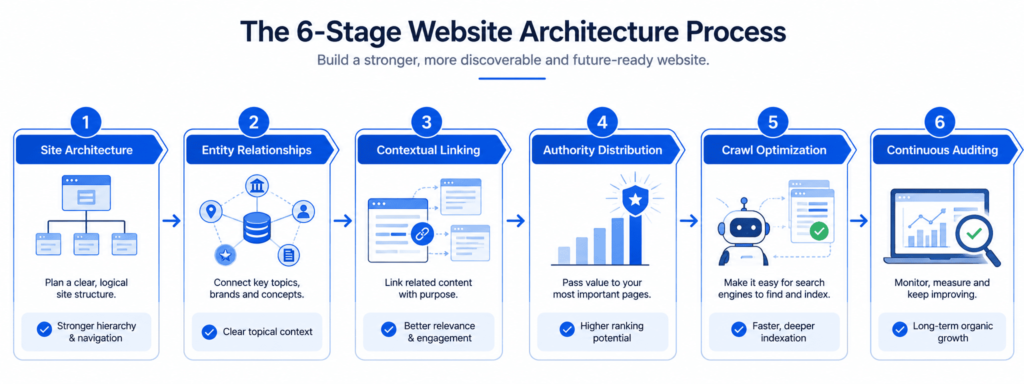
Stage 1 — Site Architecture
Before a single link is placed, the site’s hierarchy has to be decided. The model that holds up best, for both search engines and AI systems, is a pyramid: a homepage at the top, a small number of hub or pillar pages beneath it, and supporting content beneath those hubs. The practical target is that every page a business actually wants to rank — service pages, pillar guides, high-value supporting articles — should be reachable within three clicks of the homepage. Beyond that depth, discovery slows and the pages tend to receive a thinner share of the site’s overall authority.
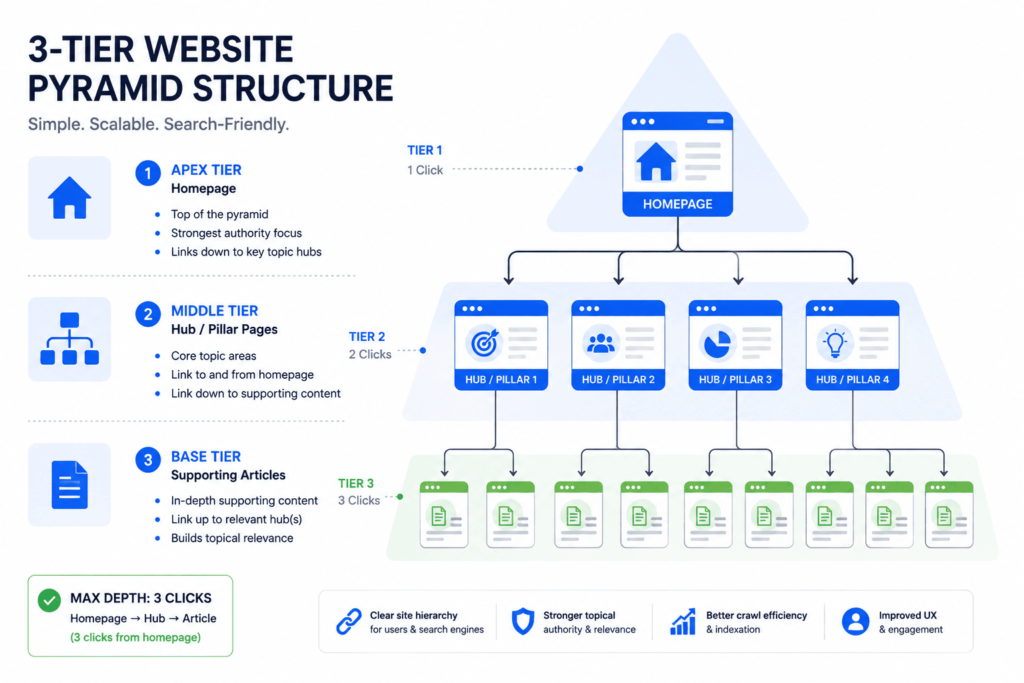
This is an architecture decision, not a linking decision — it has to be made (or corrected) before you can execute the later stages correctly. If your current site has category pages ten levels deep with no clear pillar structure, fix the architecture first. Adding contextual links on top of a broken hierarchy just optimizes a structure that shouldn’t exist.
Stage 2 — Entity Relationships
Every page should be mapped to the one topic it owns, and to the handful of related topics that genuinely support it. This is entity mapping: deciding, in writing, what a page is about before deciding what it should link to.
The common failure here is two pages competing for the same topic — a “Technical SEO” service page and a “Technical SEO” blog post both trying to rank for the same core term. When that happens, internal links can’t fix the underlying cannibalization; they just distribute confusion more efficiently. Map entities first: this page owns X, supports Y and Z, and explicitly does not compete for W. Only once that’s settled does it make sense to decide the links between pages.
Stage 3 — Contextual Linking
This is where most people start (and where they should start last). A contextual link is one placed inside the body of the content, where the surrounding sentence provides real context for both the reader and the crawler — as opposed to a link sitting in a sidebar widget or a generic “related posts” block that appears identically regardless of what the visitor is reading.
The practical guidance that holds up across most well-run sites: place links where they genuinely help the reader continue their research, not everywhere a keyword happens to appear. A commonly cited practical range is a small handful of contextual links per few hundred words of substantive content — the number matters far less than the relevance. A page stuffed with 40 internal links spreads its outbound authority so thin that none of the destinations benefit meaningfully, and it damages the reading experience in the process.
Stage 4 — Authority Distribution
Once entities are mapped and contextual opportunities are identified, decide deliberately which pages should receive the most internal links. These are usually your commercial priority pages: service pages, pillar guides, or high-intent conversion pages. Every strong, well-linked page on your site (typically the homepage and top pillar pages) should link toward these priorities, and every piece of supporting content should link up toward them as well — not just sideways to other supporting content.
This is also where orphan pages get caught. An orphan page — one with no internal links pointing to it from anywhere else on the site — is invisible to both users navigating the site and crawlers discovering it. Every page you publish should have at least one deliberate internal link pointing to it before or immediately after publication.
Stage 5 — Crawl Optimization
Internal links only pass their intended value if they resolve cleanly. This stage is a technical check on everything decided above:
- Link directly to the final URL rather than through a chain of redirects — each redirect in a chain dilutes some of the signal and adds crawl overhead.
- Confirm the destination returns a real 200 status and is set to be indexable — a link pointing to a noindexed or blocked page wastes the equity you just spent placing it.
- Avoid linking into URL patterns with unnecessary parameters, which can multiply the number of near-duplicate URLs a crawler has to sort through.
- Make sure the link is a genuine, crawlable <a href> element — not a JavaScript click handler with no underlying anchor tag.
None of this is exciting work, but a beautifully planned link structure built on broken or redirected URLs quietly loses most of its value.
Stage 6 — Continuous Auditing
Internal linking isn’t a project with an end date — it decays as a site grows. New pages get published without inbound links. Old pages get updated and their outbound links go stale. Anchor text drifts toward whatever the last writer happened to type. A quarterly internal link audit should check for: newly created orphan pages, broken internal links (a destination that’s been moved, merged, or removed), anchor text that’s become repetitive or over-optimized, and priority pages that have quietly stopped receiving new links as content has been added around them.
Sites that treat this as a one-time setup task are the ones that end up with a beautifully documented linking strategy from eighteen months ago and a current site structure that no longer resembles it.
Anchor Text Best Practices
Anchor text is the single most controllable signal in internal linking, and it’s also the easiest one to overdo. The goal is descriptive variety — text that accurately tells a reader (and a crawler) what they’ll find on the other end, without repeating the exact same phrase every time a page is linked to.
| Anchor Type | Example | Best Use | Risk if Overused |
| Exact match | “internal linking best practices” | Once, on the single most important link to that page | Reads as manipulative; can look like over-optimization |
| Partial match | “how internal linking affects crawlability” | Most contextual links — natural and still descriptive | Low risk when varied |
| Branded | “the MS Internal Link Architecture Framework™” | Linking to proprietary framework or brand pages | None, when accurate |
| Generic / navigational | “read more,” “this guide,” “click here” | Occasional use in transitional sentences | Carries no topical signal — don’t rely on it as your primary anchor strategy |
| Natural language / long-tail | “why orphan pages hurt indexing” | Blends naturally into consultative writing | Low risk; often the strongest option for AI extraction |
| Image-based | Descriptive alt text on a linked image | Visual navigation elements, diagrams | Alt text must still be accurate and descriptive |
The practical rule: rotate through partial-match and natural-language anchors as your default, reserve exact-match for the one or two most important links to a given page, and never let anchor text become the only place a link’s relevance is established — the surrounding sentence should carry meaning even if the anchor text is read on its own.
How Topic Clusters Turn Internal Linking Into Topical Authority
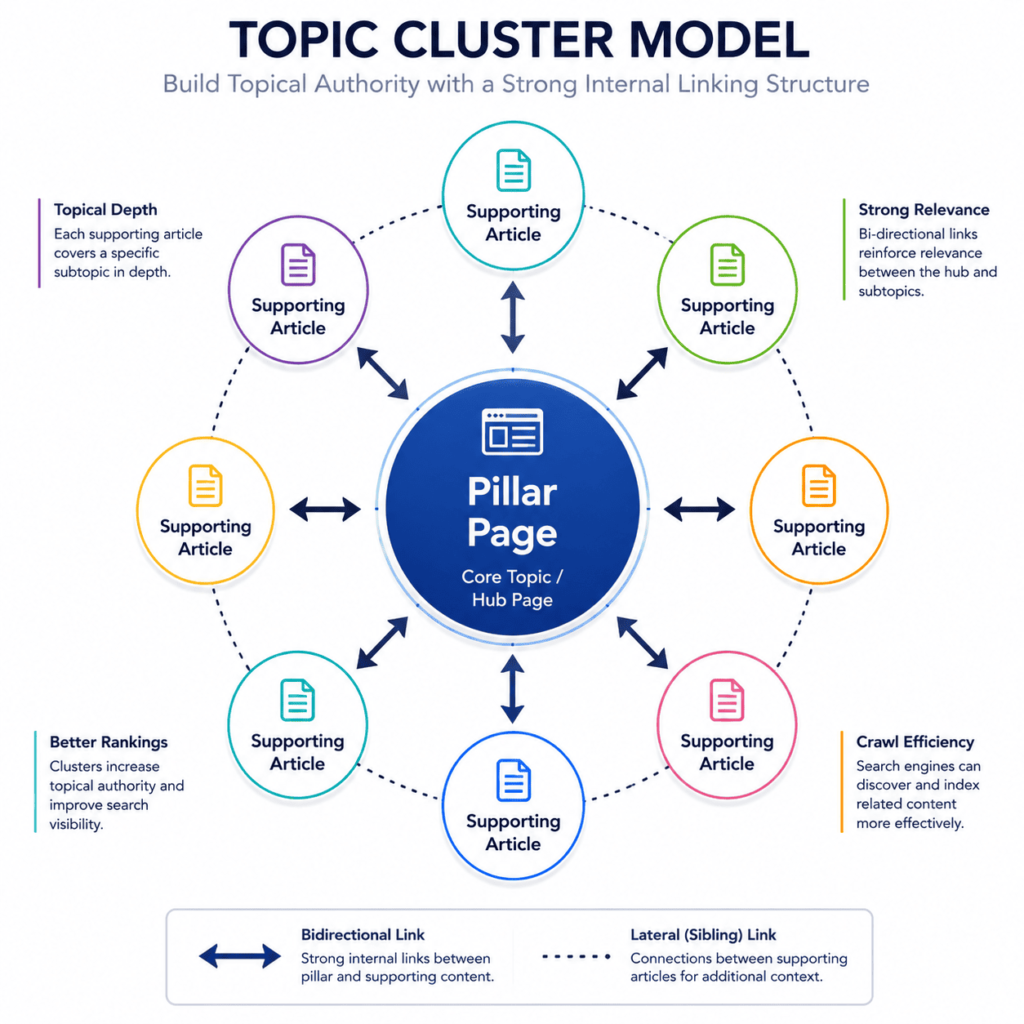
Individual links matter, but the compounding effect comes from clusters: a pillar page that comprehensively covers a broad topic, surrounded by a set of supporting articles that each own one specific, narrower piece of that topic and link back to the pillar.
The linking pattern inside a healthy cluster runs in three directions:
- Upward — every supporting article links to its parent pillar (and, further up, to the relevant commercial service page).
- Lateral — supporting articles link to their genuine siblings within the same cluster, where the connection is substantive, not just because both pages exist.
- Downward — the pillar links out to its best supporting articles, rather than only accepting links from them.
This bidirectional density is what signals topical authority. A single 5,000-word guide sitting alone can cover a topic thoroughly, but a pillar surrounded by ten to fifteen well-connected supporting pieces demonstrates depth that a single page — however long — can’t replicate on its own. It also gives search engines and AI systems many more entry points into the same topic, each reinforcing the others.
The failure mode to avoid is disconnected content: publishing articles that are topically related but never actually link to each other because they were written months apart by different people with no shared linking plan. A cluster that exists only in a content calendar, and not in the actual link graph, doesn’t function as a cluster.
How Many Internal Links Should a Page Have?
There’s no single correct number, but there is a useful way to think about the decision:
Start from relevance, not from a quota. Ask, for each candidate link: does this genuinely help a reader who’s engaged enough to be at this point in the page? If the honest answer is no, don’t add it just to hit a target link count.
Weigh link count against page length. A 400-word page with fifteen internal links has, on average, less than 30 words of context around each link — that’s rarely enough to establish real relevance. A 3,000-word guide can comfortably support considerably more links, because each one has more surrounding context to justify it.
Weigh total links against equity dilution. Every additional link on a page divides that page’s outbound authority a little further. A page with 150+ total links (including navigation and footer) spreads its equity so thin that any individual destination receives a negligible share. If a page is genuinely link-heavy — a resource hub or glossary index, for instance — that’s a legitimate exception, but it should be a deliberate design choice, not an accumulation of afterthoughts.
Default to fewer, better-placed links over many decorative ones. A page that includes four or five links, each one clearly earning its place in context, will typically outperform a page with twenty links scattered without a clear priority.
Common Internal Linking Mistakes
- Orphan pages. New content published with zero internal links pointing to it. It should never be possible for someone to publish a page without also deciding what will link to it.
- Exact-match anchor stuffing. Using the identical exact-match phrase as anchor text every single time a page is referenced. This reads as manipulative to both users and, increasingly, to ranking systems.
- Relying only on navigation and footer links. These are necessary for site usability, but because they’re identical on every page, they carry almost no contextual signal. The links that matter most are inside the content itself.
- Ignoring crawl depth. Burying a commercially important page five or six clicks from the homepage and hoping backlinks alone will compensate.
- No clearly designated priority pages. Without deciding in advance which pages should receive the most internal authority, links get distributed randomly based on whatever the writer happened to think of — usually favoring recently published content over the pages that actually drive the business.
- Treating internal linking as a one-time setup. Building a clean structure at launch and never revisiting it as the site grows, publishes, and reorganizes.
- Linking through redirect chains. Pointing new links at a URL that itself redirects to another URL, sometimes more than once, instead of updating the link to point straight at the final destination.
- Sitewide boilerplate links. The same three “popular” links inserted identically at the bottom of every article, regardless of relevance — this dilutes equity without building any real topical relationship.
A Practical Implementation Scenario
To see the framework applied, consider a hypothetical mid-market B2B site with a services hub, several service pages, and roughly forty educational articles accumulated over two years with no consistent linking plan.
Stage 1 (Architecture): An audit finds that twelve of the forty articles are more than three clicks from the homepage, buried under a blog archive with no topic-level organization. The fix is introducing pillar pages for the site’s three core service areas and re-parenting the existing articles underneath the relevant pillar.
Stage 2 (Entity Relationships): Two articles are found competing for the same core keyword under slightly different titles. Rather than deleting one, the narrower article is refocused on a sub-topic the broader one only mentions in passing, and a link is added from the broad article to the narrow one — turning a cannibalization problem into a cluster relationship.
Stage 3 (Contextual Linking): Each of the forty articles is reviewed for genuine linking opportunities within the body text, rather than relying on an automated “related posts” widget. On average, three to six contextual links are added per article, each with unique, descriptive anchor text.
Stage 4 (Authority Distribution): The three service pages are identified as priority destinations. Every pillar page is checked to confirm it links to its corresponding service page, and every supporting article is checked to confirm it links, directly or through its pillar, back toward that same destination.
Stage 5 (Crawl Optimization): A crawl turns up six internal links pointing at URLs that had since been redirected, and two pointing at a page accidentally left noindex after a migration. Both are corrected.
Stage 6 (Continuous Auditing): A recurring quarterly review is scheduled, checking specifically for new orphan pages and broken internal links as new content is published.
None of the individual steps here are exotic. The value comes from doing them in this order, and from treating the result as something that needs to be revisited — not from any single clever trick.
Internal Linking Checklist
Use this as a working audit list. A downloadable, printable version is available separately.
- Every priority page (service pages, pillar guides, high-intent conversion pages) is reachable within three clicks of the homepage
- Every published page has at least one internal link pointing to it — zero orphan pages
- Each page has a clearly defined primary entity/topic, with no two pages competing for the same one
- Contextual links are placed inside body content, not only in navigation, sidebars, or generic “related content” widgets
- Anchor text is varied and descriptive — exact-match reserved for the single most important link to a page
- Supporting articles link upward to their pillar page and, from there, toward the relevant service page
- Pillar pages link back out to their strongest supporting articles
- No internal links point through redirect chains
- All internally linked destinations return a 200 status and are set to be indexable
- Total on-page link count is proportionate to content length and genuine relevance, not padded to hit a number
- A recurring (at minimum quarterly) audit is scheduled to catch new orphan pages, broken links, and anchor text drift
Take This Checklist With You
Get the printable, interactive PDF version of the Internal Linking Audit Checklist to use for your next site review.
Download the Internal Linking Checklist (PDF)Internal Linking and AI Search Visibility (GEO Considerations)
As AI Overviews, AI Mode, and chat-based assistants increasingly answer queries by drawing on relationships between several pages rather than presenting a single ranked link, the internal link graph becomes part of how these systems understand your site’s structure. A well-built cluster — pillar and supporting content, densely and accurately linked, with anchor text that clearly names the concept on the other end — gives an AI system a legible map of “here is the comprehensive page on this topic, and here are the specific sub-topics that support it.”
Practically, this reinforces everything above rather than requiring anything new: clear entity ownership per page, descriptive (not generic) anchor text, and a structure where the most authoritative page on a topic is also the most heavily and consistently linked one. Sites that never established this kind of structure are harder for both traditional crawlers and AI systems to parse into a coherent topical map — no amount of individually well-written pages fully compensates for a disconnected structure.
FAQ
What is the difference between internal linking and backlinks? Internal links connect pages within the same domain and are entirely under your control. Backlinks come from other domains and function as an external trust signal you can influence but not directly control.
How many internal links should a page have? There’s no fixed number. The right approach is to add links where they genuinely help the reader, scale the total roughly with content length, and avoid enough total links on one page that outbound authority gets spread too thin to matter.
Does anchor text still matter for internal links in 2026? Yes. Descriptive, varied anchor text helps both readers and AI systems understand what a linked page is about. What’s changed is the penalty for overdoing exact-match repetition, which now reads as manipulative rather than helpful.
What is an orphan page and why is it a problem? An orphan page has no internal links pointing to it from anywhere else on the site. Because search engines primarily discover pages by following links, orphan pages are harder to find, slower to get crawled, and effectively invisible in normal site navigation.
How does internal linking affect AI Overviews and AI search visibility? A clearly linked cluster structure — pillar page plus supporting articles, connected with descriptive anchor text — gives AI systems a legible map of which page is the authoritative source on a topic and which pages support it, improving the odds of accurate citation.
Should I use nofollow on internal links? Generally, no. Internal links should typically be left to pass their full signal. nofollow on internal links is occasionally used for genuinely low-value destinations (like a terms-of-service page linked from every footer), but applying it broadly usually does more harm than good.
How often should I audit my internal linking structure? At minimum quarterly, and always immediately after a site migration, a URL restructuring, or a large batch of new content — all three commonly create fresh orphan pages and broken links.
Summary and Next Steps
Internal linking is the one SEO lever you fully control, and it does more work in an AI-search environment than it did five years ago, not less. The MS Internal Link Architecture Framework™ — Site Architecture → Entity Relationships → Contextual Linking → Authority Distribution → Crawl Optimization → Continuous Auditing — gives you a repeatable sequence for building that structure deliberately instead of accumulating it by accident.
If you want a second set of eyes on how your own site’s current structure holds up against this framework — including orphan pages, crawl depth, and where your authority is currently (mis)directed — that’s exactly what an SEO audit is built to surface.
Ready to Fix Your Site’s Internal Link Structure?
Uncover orphan pages, fix equity dilution, and optimize crawl depth with a comprehensive internal linking and site architecture audit.
Book an SEO Audit →