
What Is an SEO Audit Checklist?
An SEO audit checklist is a structured set of diagnostic checkpoints used to evaluate whether a website meets the technical, content, and experience standards required to be crawled, indexed, understood, and ranked by search engines and AI systems.
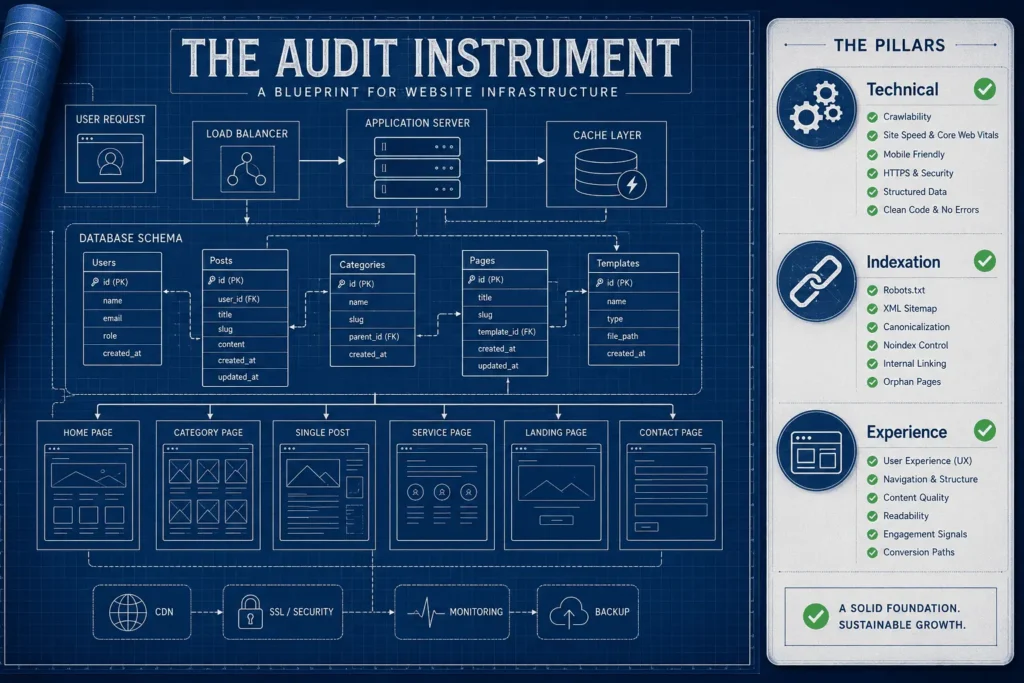
A checklist is not the audit itself. It is the instrument used to conduct one. The audit is the process of applying that instrument to a real website and interpreting what the results mean for the business. This distinction matters because most SEO problems are diagnosed correctly but prioritized incorrectly — teams fix low-impact issues first because a checklist told them something was “wrong,” without any framework for understanding how wrong, or how much it matters.
That is the gap this checklist is built to close.
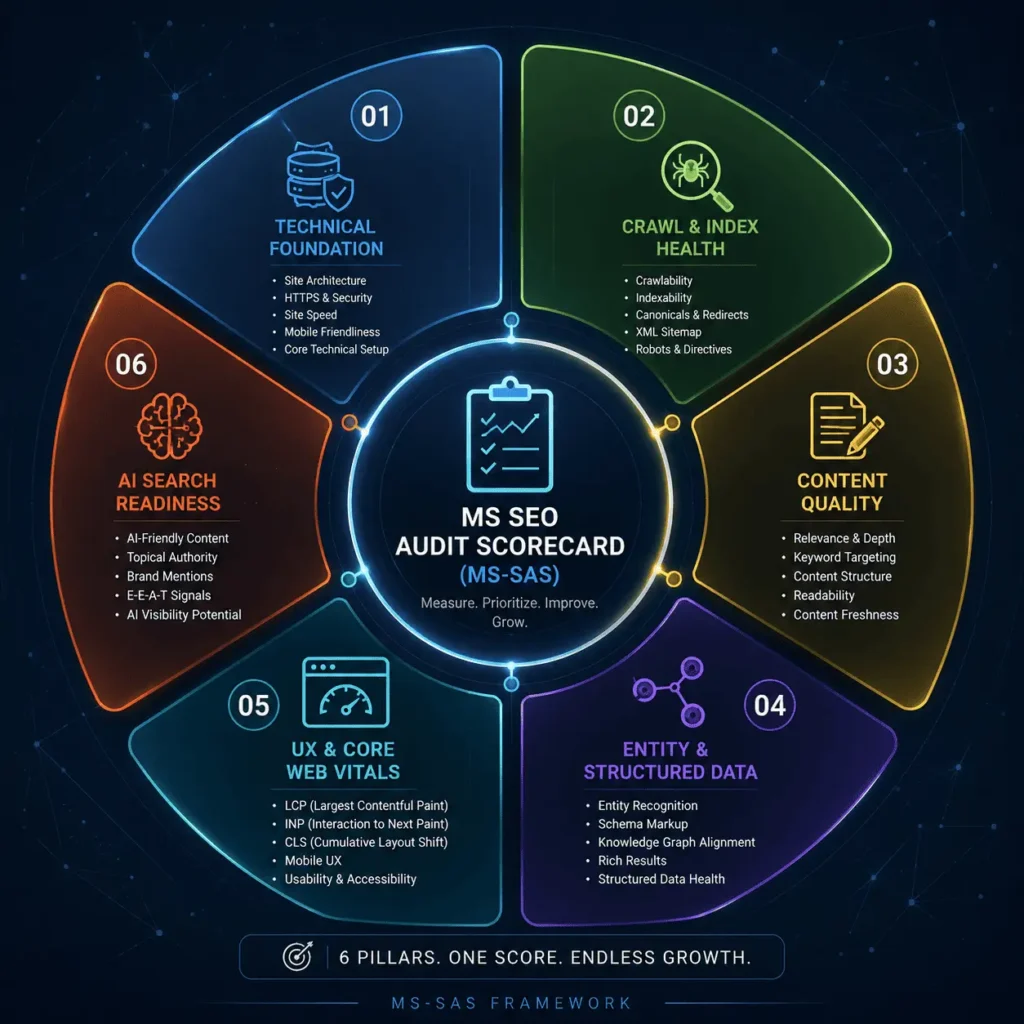
Rather than a flat list of tasks, this resource is organized around the MS SEO Audit Scorecard (MS-SAS) — a six-pillar framework Marketing Scrappers uses internally, and now makes available as a self-assessment tool, to grade a website’s SEO maturity and identify which issues carry real business consequences versus which are cosmetic.
A properly used SEO audit checklist should help you answer three questions:
- Where is this website losing visibility, traffic, or conversions today?
- Which of those losses are self-serviceable, and which require deeper technical intervention?
- What should be fixed first, based on business impact rather than checklist order?
If a checklist cannot help you answer those three questions, it is a task list, not an audit tool.
Free Resource:
Get the interactive version of this checklist with automated pillar scoring calculations.
Download the Interactive SEO Audit Checklist
When to Use This Checklist
An SEO audit checklist earns its value at specific decision points, not as a routine chore. Use it when one of the following applies:
Before hiring an SEO agency or consultant. Running your own assessment first means you walk into that conversation already understanding your site’s rough shape, which makes it far easier to evaluate whether a proposal is addressing your real problems or offering generic services.
On a recurring quarterly cadence. Search algorithms, Core Web Vitals thresholds, and AI search behavior all shift over time. A quarterly self-check catches regressions — a broken sitemap, a newly noindexed section, a Core Web Vitals score that slipped after a design update — before they compound.
After a traffic or ranking drop. A checklist gives you a systematic way to rule things in or out (indexation, technical errors, content decay, a manual action) rather than guessing.
Before a site migration, redesign, or replatform. Pre- and post-migration audits are the single highest-leverage use of a checklist, because migrations are where SEO equity is most commonly lost — through broken redirects, changed URL structures, or stripped structured data.
When evaluating a new website or acquisition. If you are acquiring a domain, a business, or inheriting a site from a previous team, the checklist gives you a fast, structured way to understand what you are working with.
Framework Note: This checklist is intentionally a self-assessment and lead qualification tool. It is designed to surface issues, not to fully diagnose or fix them. The SEO Audit Service exists specifically for the diagnostic depth — log file analysis, crawl budget modeling, JavaScript rendering audits — that a self-guided checklist cannot replicate.
How the MS-SAS Works
Most public SEO checklists are organized around tools (a Screaming Frog checklist, an Ahrefs checklist) or around isolated tactics (a robots.txt checklist, a meta tag checklist). That structure makes them thorough but disconnected — a business owner finishes forty checkboxes with no sense of which ones actually matter.
The MS SEO Audit Scorecard (MS-SAS) organizes every checkpoint into six pillars that map directly to how search engines and AI systems evaluate a website (similar to our core SEO services hub): whether they can technically access it, whether they choose to index it, whether the content is worth ranking, whether the entity behind it is understood, whether the experience holds up for real users, and whether the content is structured well enough to be extracted and cited by AI-assisted search.
| Pillar | Core Question It Answers | Why It Matters |
| 1. Technical Foundation | Can search engines physically access this site? | Everything else is irrelevant if the site is technically broken. |
| 2. Crawl & Index Health | Is the right content being found and indexed? | Pages that aren’t indexed cannot rank, regardless of quality. |
| 3. Content Quality | Does the content satisfy the intent behind the query? | Indexation without relevance and depth produces no results. |
| 4. Entity & Structured Data | Do search engines and AI systems understand what this is? | Entity clarity increasingly determines visibility in AI Overviews and answer engines. |
| 5. UX & Core Web Vitals | Does the experience hold up for real users on real devices? | Page experience is a confirmed ranking input and a direct conversion factor. |
| 6. AI Search Readiness | Can this content be extracted, summarized, and cited by AI systems? | Search behavior is shifting toward AI-assisted and zero-click answers. |
Each pillar is scored independently, then combined into a single SEO Health Score, explained below. Scoring each pillar separately — rather than producing one blended number from the start — is what allows the checklist to function as a prioritization tool instead of a pass/fail test. A site can score well on Technical Foundation and poorly on AI Search Readiness, and that gap tells you exactly where to focus next.
Interactive SEO Audit Checklist: The 6 Pillars
The checklist below reflects the full MS-SAS structure. The interactive version (available via download) lets you check off items and calculates your pillar and overall scores automatically. The static version below shows every checkpoint it evaluates.
Pillar 1 — Technical Foundation
- [ ] Site loads on HTTPS across every page, with no mixed-content warnings
- [ ] One canonical domain version is enforced (www vs. non-www, trailing slash, HTTP vs. HTTPS all resolve to a single version)
- [ ] URL structure is logical, lowercase, and free of unnecessary parameters
- [ ] No redirect chains longer than a single hop
- [ ] Custom 404 page exists and broken internal links are monitored
- [ ] Site renders correctly and consistently on mobile devices
- [ ] Server response time (TTFB) is consistently fast under normal load
- [ ] XML sitemap exists, is accurate, and is submitted in Search Console
- [ ] Robots.txt does not accidentally block CSS, JS, or important sections
Pillar 2 — Crawl & Index Health
- [ ] Search Console Index Coverage report reviewed for exclusions and errors
- [ ] No orphan pages (pages with zero internal links pointing to them)
- [ ] Ratio of indexed pages to published pages reviewed and explained
- [ ] Duplicate and thin content identified and consolidated or removed
- [ ] Canonical tags are implemented correctly and point to the intended URL
- [ ] Pagination and faceted navigation do not create crawl waste
- [ ] No important pages are unintentionally set to noindex
- [ ] Internal search results and filtered URLs are excluded from indexing where appropriate
- For detailed technical standards on crawling and indexing, refer to the Google Search Central documentation.
Pillar 3 — Content Quality
- [ ] Each page’s content matches the dominant search intent it targets
- [ ] No two pages compete for the same primary keyword (cannibalization)
- [ ] Top pages match or exceed the depth of current top-ranking competitors
- [ ] Content includes a clear, direct answer near the top of the page
- [ ] Every page has one H1 and a logical H2/H3 hierarchy
- [ ] Internal linking connects each page to a relevant parent and related content
- [ ] Content has been reviewed or updated within the last 12 months
- [ ] Pages provide a unique angle, framework, or data point not found in generic competitor content
Pillar 4 — Entity & Structured Data
- [ ] Organization schema is implemented and validated
- [ ] Page-appropriate schema types are used (Article, Product, FAQ, HowTo, LocalBusiness, etc.)
- [ ] Structured data passes validation with zero critical errors
- [ ] Business name, descriptions, and key facts are consistent across the site and external profiles
- [ ] Author or expert attribution is present on authority content
- [ ] Key proprietary terms and frameworks are defined consistently sitewide
- [ ] Breadcrumb schema reflects the actual site architecture
- Schema Validation: Ensure Organization and page markup follow the standard Schema.org vocabulary.
Pillar 5 — UX & Core Web Vitals
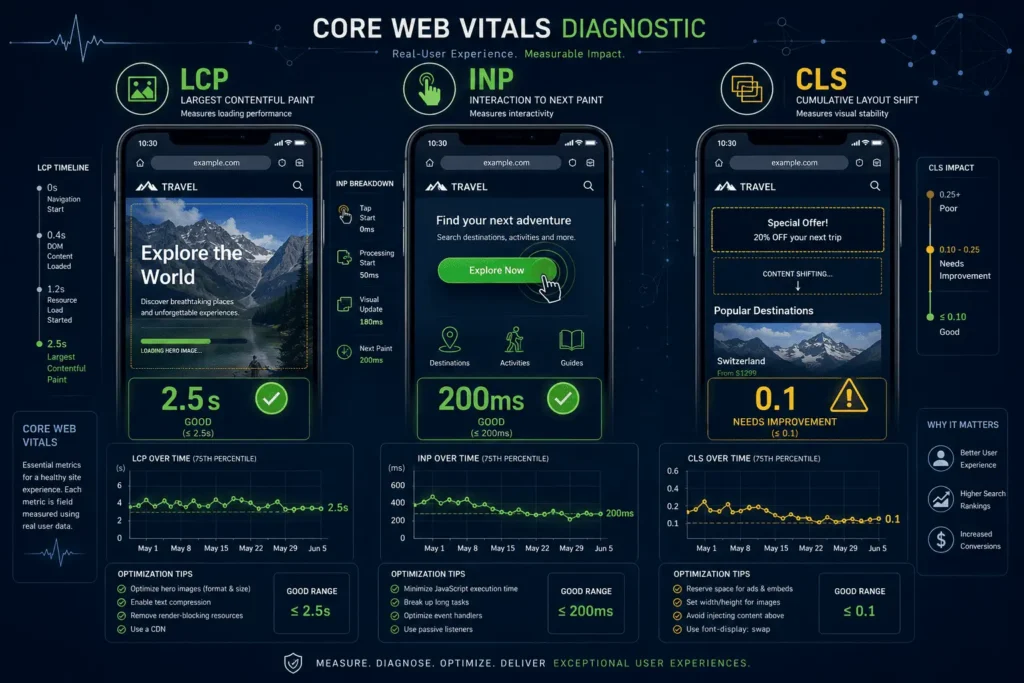
- [ ] Largest Contentful Paint (LCP) is under 2.5 seconds at the 75th percentile
- [ ] Interaction to Next Paint (INP) is under 200 milliseconds at the 75th percentile
- [ ] Cumulative Layout Shift (CLS) is under 0.1
- [ ] Mobile Usability report in Search Console shows no errors
- [ ] No intrusive interstitials blocking content on mobile
- [ ] Navigation is clear and consistent across templates
- [ ] Tap targets and font sizing meet accessibility standards
- Core Web Vitals Thresholds: Align LCP, INP, and CLS performance metrics directly with Google’s Core Web Vitals guidelines.
Pillar 6 — AI Search Readiness
- [ ] Key pages include a clear, extractable definition near the top
- [ ] Important comparisons, processes, or frameworks are presented in lists or tables
- [ ] FAQ schema is implemented for genuinely common questions
- [ ] Content directly answers “what,” “why,” and “how” rather than implying it
- [ ] The site has at least one named, original framework or methodology
- [ ] Content is server-rendered or otherwise accessible without requiring JavaScript execution
- [ ] Expertise signals (author bios, credentials, original research) are visible on authority pages
Expert Box: In practice, most self-audits score unevenly across pillars — strong on Technical Foundation, weak on AI Search Readiness. That pattern itself is diagnostic: it usually means a site was built for legacy search engines and has not been adapted for how AI-assisted search extracts and cites content today.
SEO Health Score Interpretation
Each pillar is scored out of 100 based on the percentage of checklist items satisfied. The six pillar scores are averaged to produce an overall SEO Health Score.
| Score Range | Rating | What It Means |
| 0–40 | Critical Risk | Foundational issues are actively suppressing visibility. Fixes here take priority over any content or growth work. |
| 41–60 | Needs Attention | Meaningful gaps exist across multiple pillars. Results are likely inconsistent and hard to attribute. |
| 61–75 | Solid Foundation | Core technical and content standards are met. Remaining gaps are optimization opportunities, not liabilities. |
| 76–90 | Audit-Ready | The site is in strong shape. This is the point where advanced technical, entity, and AI visibility strategy adds the most value. |
| 91–100 | Optimized | Rare in practice. The priority shifts from remediation to ongoing monitoring and defending existing performance. |
Need Deeper Diagnostics?
While a checklist identifies surface issues, resolving deep technical blockers requires advanced crawl modeling and log analysis.
Request a Professional SEO Audit
The overall score is useful for tracking progress over time, but the pillar-level scores are what should drive action. A site scoring 78 overall with a 30 on Crawl & Index Health does not have a minor issue — it has one pillar quietly capping the performance of the other five. Fix the lowest-scoring pillar with the highest business impact first, not the pillar that is easiest to improve.
Common Website SEO Audit Mistakes to Avoid
Treating the checklist as pass/fail instead of a prioritization tool. Checking thirty of forty boxes feels productive, but if the ten unchecked items include a noindex tag on a commercial page, the score is misleading. Severity matters more than completion percentage.
Fixing low-impact items before high-impact ones. Optimizing a favicon or minor meta description while an indexation issue is suppressing an entire section of the site is a common and costly ordering mistake.
Auditing pages in isolation. A single page can pass every checklist item and still underperform because of sitewide issues — crawl budget waste elsewhere, a cannibalizing page, or a template-level Core Web Vitals problem affecting every page built on it.
Making changes without a baseline. Without recording current rankings, indexation status, and Core Web Vitals scores before making fixes, it becomes impossible to prove which changes worked.
Confusing “crawled” with “good.” A page being crawled and indexed says nothing about whether it satisfies intent or competes well in its category. Indexation is a minimum requirement, not a quality signal.
Skipping structured data validation. Implementing schema without validating it is functionally the same as not implementing it — malformed markup is typically ignored rather than partially honored.
Ignoring AI Search Readiness entirely. Many checklists still stop at 2019-era on-page and technical SEO. A site can satisfy every traditional checkpoint and still be invisible in AI Overviews and answer engines because its content isn’t structured for extraction.
When You Need a Professional SEO Audit
A checklist-based self-audit is genuinely useful for surfacing issues and building internal understanding. It is not a substitute for a professional audit when the situation calls for deeper diagnostic work.
| Dimension | Self-Audit (This Checklist) | Professional SEO Audit |
| Scope | Sitewide checkpoints, self-reported | Full technical, content, and competitive diagnostic |
| Tooling depth | Search Console, PageSpeed Insights, browser tools | Log file analysis, crawl budget modeling, JavaScript rendering testing, enterprise crawlers |
| Root-cause diagnosis | Identifies symptoms | Traces symptoms to underlying architecture, template, or system causes |
| Prioritization | General severity bands | Prioritized by projected business impact and effort |
| Competitive context | Not included | Benchmarked against direct competitors and category leaders |
| Output | A completed checklist and health score | A prioritized remediation roadmap with implementation guidance |
| Best suited for | Routine checks, early-stage evaluation, internal alignment | Traffic drops, migrations, enterprise sites, persistent underperformance |
Consider a professional audit when any of the following apply:
- Multiple MS-SAS pillars score below 60
- Organic traffic or rankings have dropped more than 20% without an obvious cause
- The site is preparing for a migration, redesign, or replatform
- Competitors with comparable content consistently outrank the site
- The site is large enough (typically 1,000+ URLs) that crawl budget and log file analysis become necessary
- Previous fixes based on generic checklists haven’t moved the needle
This checklist is designed to complement, not replace, that deeper diagnostic work. Its purpose is to help you walk into a professional audit already informed, or to confirm your site is genuinely healthy enough that a full audit isn’t yet the right investment.
Frequently Asked Questions
What is an SEO audit checklist? An SEO audit checklist is a structured list of technical, content, and experience checkpoints used to evaluate a website’s SEO health. It identifies issues but does not, by itself, diagnose root causes or prioritize fixes by business impact — that requires interpretation, which is what a framework like the MS-SAS or a professional audit provides.
How often should I run an SEO audit? A lightweight self-audit on a quarterly basis is reasonable for most sites. A full professional audit is typically warranted annually, after a significant traffic change, or before/after a major site change such as a migration or redesign.
Can I do an SEO audit myself? Yes, for the checkpoints covered in this checklist — technical basics, indexation, on-page content, structured data validation, and Core Web Vitals. Deeper diagnostics such as log file analysis, crawl budget modeling, and competitive benchmarking generally require specialized tools and experience.
What’s the difference between a technical SEO audit and a full SEO audit? A technical SEO audit focuses specifically on crawlability, indexability, site architecture, and performance. A full SEO audit includes those elements plus content quality, entity and structured data, and increasingly, AI search readiness — closer to what the MS-SAS evaluates.
How long does an SEO audit take? A checklist-based self-audit can typically be completed in a few hours for a small site. A professional audit on a mid-sized to enterprise site commonly takes one to several weeks, depending on site size and the depth of diagnostic work required.
What tools do I need for a DIY SEO audit? Google Search Console and PageSpeed Insights cover most of the checkpoints in this checklist at no cost. A crawler tool (such as Screaming Frog’s free tier) helps with sitewide checks like redirect chains, duplicate titles, and orphan pages.
What is a good SEO health score? A score of 76 or above on the MS-SAS generally indicates a site is in strong shape and ready for advanced optimization rather than remediation. Scores below 60 usually indicate foundational issues that should be addressed before investing further in content or growth initiatives.
Does this checklist replace a professional SEO audit? No. It is designed to help you self-assess, prioritize obvious issues, and prepare for a more informed conversation with an SEO professional — not to replace the deeper diagnostic and strategic work involved in a full SEO Audit Service engagement.
Download & Next Steps
Completing this checklist gives you an honest, structured view of where your website stands across all six MS-SAS pillars — and, more importantly, which gaps are worth acting on first.
If your Health Score came back strong across the board, the right next move is usually to invest in Technical SEO refinement or deeper content and entity strategy. If one or more pillars scored below 60, or you’re not fully confident in your own diagnosis, that’s the signal to bring in a professional audit rather than continue troubleshooting checklist items in isolation.